

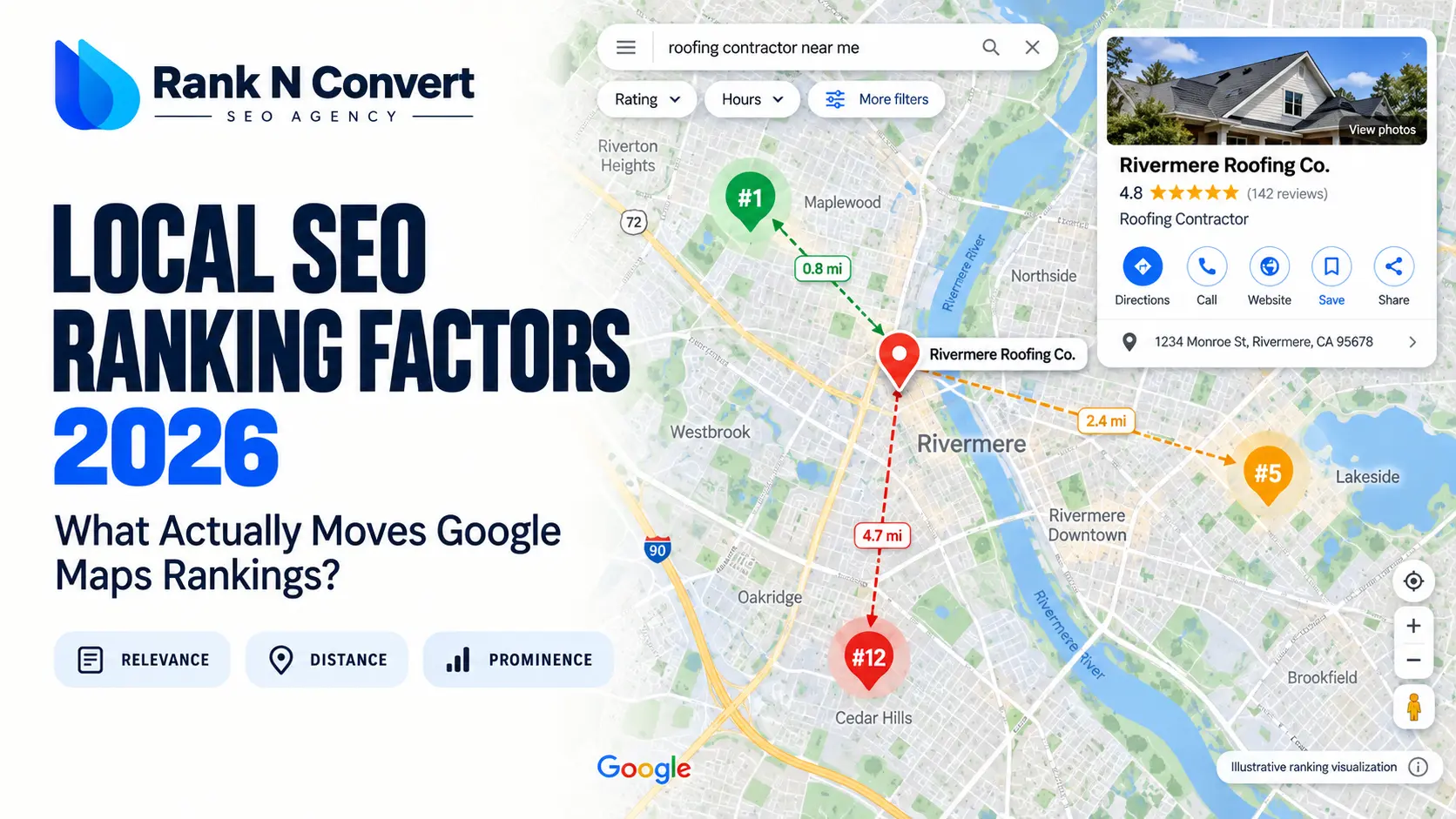
Your Google Business Profile is fully optimized, you’ve collected reviews, yet a competitor with fewer reviews still outranks you on Google Maps. Why? Because local rankings aren’t simply about completing an SEO checklist.
Google considers relevance, distance and prominence, but knowing these factors doesn’t tell you what’s holding your business back. This guide examines the local SEO ranking factors that matter in 2026, separating confirmed signals from industry research and unproven tactics. You’ll discover why your rankings vary by location, which factors you can influence and how to identify improvements worth your time and budget.
Quick Answer: What Actually Moves Google Maps Rankings in 2026?
Google Maps rankings in 2026 depend on three main factors: relevance, distance and prominence. Your primary Google Business Profile category helps establish relevance, proximity affects local results, and reviews, ratings and website links contribute to prominence.
However, not every optimization has a proven ranking effect. Whitespark’s 2026 expert survey and Localo’s analysis of 16,098 business profiles offer useful insights, but expert opinions and correlations don’t reveal Google’s actual ranking weights or establish causation.
2026 Google Maps Ranking Factors: Evidence and What to Do
| Ranking factor | What the evidence shows | Can you influence it? | What should you do? |
| Search relevance and primary category | Google’s official guidance confirms relevance. Whitespark’s 2026 experts rated the primary GBP category as the most influential individual Maps factor. | Yes | Choose the most specific, accurate primary category for your main business activity. Add only genuinely relevant secondary categories. |
| Distance from the searcher | Google confirms distance as a primary ranking consideration. Your visibility can change depending on where someone searches. | Usually not without relocating | Measure rankings across your actual service area. Don’t assume adding more cities to your profile will overcome proximity. |
| Business name | Experts rate keywords in business names highly, but Google’s business guidelines require your genuine, consistently used business name. | Only through a genuine name change | Use your real business name. Never add service or location keywords solely to manipulate rankings. |
| Reviews and ratings | Google confirms that review quantity and positive ratings can help local rankings. | Yes | Request genuine reviews from customers, respond to relevant feedback and compare your review profile with nearby competitors in the same category. |
| Website authority and local relevance | Google identifies links as a prominence signal. Industry research also assigns importance to locally relevant website content. | Partly | Create useful service and location pages where appropriate, keep business details accurate and earn relevant, reputable links. |
| Photos, Google Posts and citations | Localo’s 2026 research found several associations with higher rankings, but these do not establish that adding more will cause improvement. | Yes, with uncertain ranking effects | Maintain useful photos, relevant updates and accurate listings. Avoid arbitrary upload schedules and bulk citation campaigns. |
What Determines Google Maps Rankings in 2026?
Google evaluates local searches using three main factors: relevance, distance and prominence. Together, they help explain why a business can rank in the Google 3-Pack nearby but disappear a few miles away, or why a competitor with fewer reviews may rank higher. Google doesn’t disclose the exact weight of each factor.
Relevance — How Well Does Your Business Match the Search?
Relevance measures how closely your Google Business Profile matches a searcher’s query. Your primary category establishes your main business activity, while services, products and other profile details provide supporting information.
For example, Google recommends choosing “Nail salon” over the broader “Beauty salon” category when it accurately describes your business.
Likewise, a dental clinic offering emergency appointments should list that service accurately. However, adding “emergency dentist” to its description doesn’t guarantee rankings for related searches.
Distance — How Does the Searcher’s Location Change the Results?
Distance measures how far your business is from the location Google associates with a search. When someone doesn’t specify a location, Google estimates it using available location information.
Consider three searches for the same plumbing business:
- Nearby search: Someone searching for “plumber near me” a few streets away may see your business among the top local results.
- Another neighborhood: The same query from several miles away may return different competitors, even though your profile hasn’t changed.
- City-specific search: “Emergency plumber in Brooklyn” establishes a geographic target, but results can still vary by searcher location.
Checking rankings only from your office can therefore misrepresent your actual local visibility. Adding more cities to your service-area settings won’t automatically overcome proximity limitations.
How search location changes Google Maps results
The same business can rank in the Google 3-Pack near its location but disappear from the top results in another neighborhood. Searcher location, query relevance and nearby competition all affect visibility.
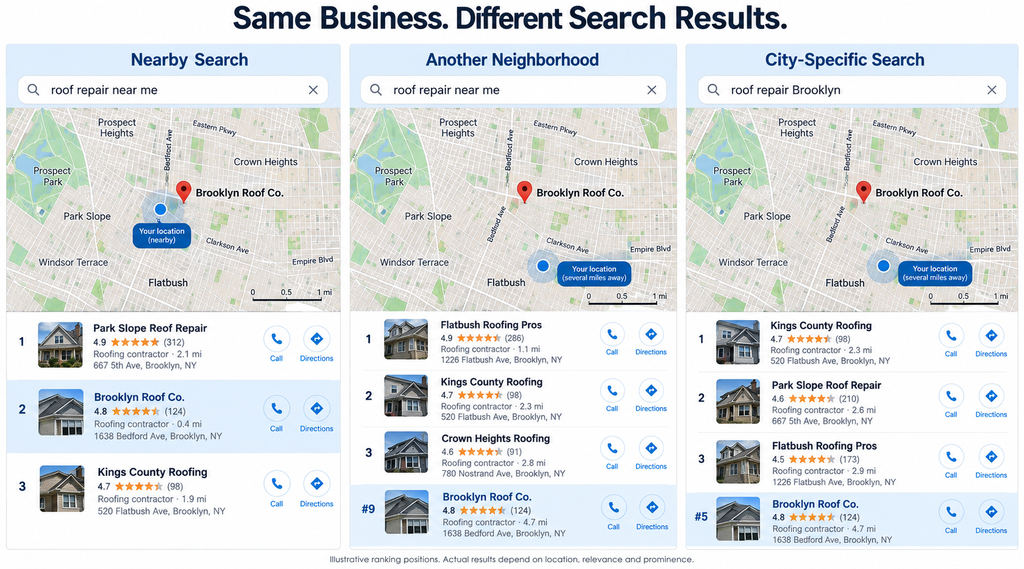
Compare results across multiple search points to understand where your business actually ranks.
Prominence — Why Do Some Businesses Rank Beyond Their Immediate Area?
Prominence describes how well-known a business is, based partly on signals Google can find across the web.
According to Google’s official local ranking documentation, website links, review quantity and positive ratings can contribute to local prominence.
Consider two restaurants serving similar food. One has an established reputation, numerous genuine customer reviews and links from relevant local publications. The other is newer, with little recognition outside its immediate neighborhood.
The established restaurant may appear for searches made farther away, provided it is sufficiently relevant to the query. Proximity still matters, but the closest business doesn’t automatically receive the highest position.
This is also why comparing review counts alone won’t explain every competitor’s ranking. A business’s local reputation extends beyond the information visible on its Google Business Profile.
What Do Google’s Official Guidance and 2026 Ranking Studies Actually Prove?
Google explains the broad considerations behind local rankings but keeps the details of its ranking algorithm confidential. Industry researchers therefore use expert surveys, observational datasets and practical experiments to investigate individual Google Maps ranking factors.
For example, Whitespark’s 2026 Local Search Ranking Factors report surveyed 47 local SEO experts about 187 potential factors. Published on November 6, 2025, it found that contributors rated primary business category, proximity and keywords in the business name among the most influential local-pack signals.
But these are expert assessments, not Google’s published algorithmic weights. A more recent September 2026 study by Localo examined 17 of those factors using observational data from 16,098 Google Business Profiles. Its findings disagreed with several practitioner assessments, particularly concerning certain profile activity and content signals.
That disagreement matters because businesses often spend money on tactics whose independent ranking effects remain unproven.
| Evidence class | What it establishes | How to interpret it |
| Officially documented | Google’s publicly confirmed ranking considerations and policies. | The starting point for understanding the system and complying with its requirements. |
| Practitioner assessment | Which factors experienced local SEO professionals consider influential. | Useful for identifying priorities and hypotheses, but not proof of algorithmic weight. |
| Observational finding | Patterns identified across businesses, profiles or search results. | Shows associations, but doesn’t automatically establish cause and effect. |
| Experimental finding | What happens under a documented test with appropriate controls. | Can provide stronger causal evidence within the tested conditions, but may not generalize to every business. |
| Unresolved | Claims for which reliable evidence is insufficient or contradictory. | Requires further verification before being treated as established ranking advice. |
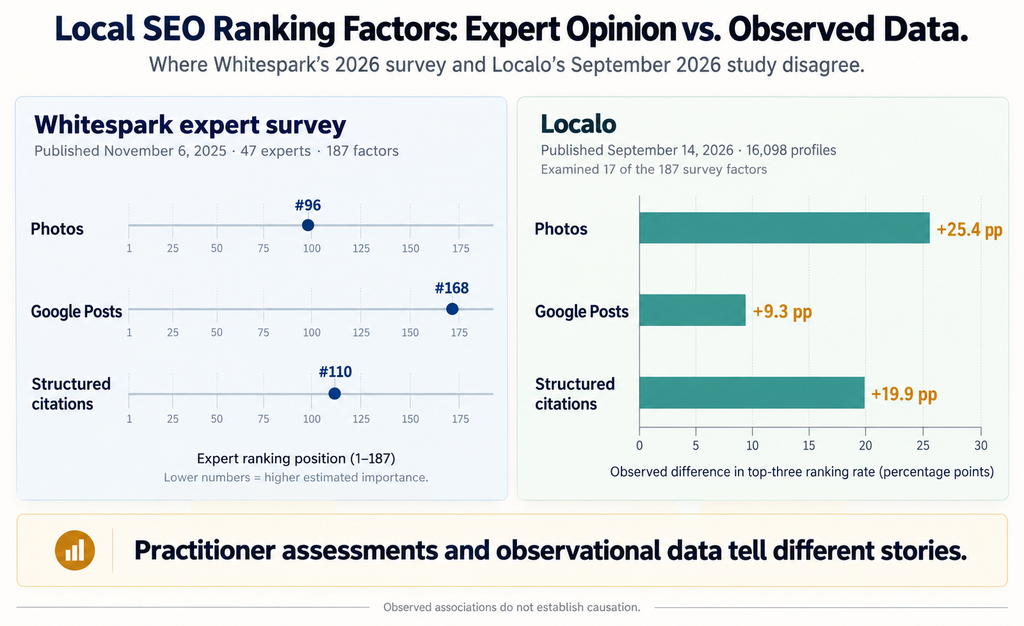
These distinctions are particularly important for factors such as photos, Google Posts and citations, where the latest research does not always support the same conclusions.
For your own business, the first practical question is which part of the ranking system you can realistically influence. That starts with your Google Business Profile category and the information Google uses to understand exactly what your business offers.
Which Google Business Profile Factors Can You Actually Optimize?
Your Google Business Profile gives you control over how you describe your business, but some fields have more bearing on search relevance than others. Before adding more content or chasing new keywords, check whether your profile accurately represents what customers are searching for.
Primary Category: How to Choose the Best Match for Your Main Service
Your primary category tells Google what kind of business you operate. It can influence which searches your profile is eligible to appear for, making it one of the most important decisions in Google Business Profile optimization.
For example, a business specializing in manicures and nail extensions might use the broad category “Beauty salon” when “Nail salon” describes its main activity more precisely. The narrower category provides a clearer match for customers searching for nail services.
In Whitespark’s 2026 Local Search Ranking Factors survey, 47 local SEO experts rated the primary GBP category as the most influential individual factor for local pack and Maps rankings. This reflects practitioner assessments, not a disclosed Google ranking weight.
To select your primary category:
- Identify your core business: Consider what your business primarily does, rather than choosing a category for every service you offer.”
- Check Google’s available categories: Select the most specific category that accurately represents your business. If an exact match isn’t available, choose the closest appropriate category.
- Examine your actual search result: Search for your main service from your target location and inspect the primary categories of relevant competing businesses. Use these findings to identify possible category mismatches, not simply to copy the highest-ranking competitor.
Google’s business category guidance explicitly recommends selecting specific categories where available, such as “Nail salon” instead of a general salon category.
Changing your primary category can also trigger re-verification. Make changes when they correct your business classification, not whenever rankings fluctuate.
Secondary Categories: When Do They Expand Your Search Relevance?
Secondary categories help Google understand other business activities beyond your primary category.
Consider a grocery store that also operates its own bakery and deli. “Grocery store” describes its main business, while “Bakery” and “Deli” may accurately represent its additional operations.
Google allows up to nine additional categories, but that is a limit, not an optimization target.
A 2026 Localo study of 16,098 Google Business Profiles found that businesses with six additional categories had a 69.1% top-three ranking rate within its monitored sample. However, this association doesn’t prove that adding six categories will improve an individual business’s rankings. More established businesses may simply offer a wider range of services.
Follow Google’s rule: choose the fewest categories needed to accurately describe your business. A category should describe what your business is, not an unrelated product, occasional service or neighboring business.
| Check | Question to answer |
| Core business | What is the main activity customers recognize us for? |
| Target searches | Which relevant searches should our business genuinely satisfy? |
| Available categories | Which specific Google categories accurately describe our operations? |
| Local competitors | What primary categories do comparable businesses use? |
| Final selection | Which category best describes our core business, and which additional categories represent genuine secondary activities? |
Use this worksheet before changing categories. It prevents an important local SEO mistake: choosing categories to target keywords rather than to accurately classify the business.
Services, Descriptions and Profile Completeness: What Do They Contribute?
Choosing the right categories is only part of establishing relevance. Your services and business description provide supporting details about what customers can actually expect.
A plumbing company, for example, might offer drain cleaning, water heater installation and emergency leak repairs. Adding those genuine services to its profile helps customers identify whether the company handles their particular problem. Google recommends maintaining complete and accurate business information because it helps the search system understand and match businesses to relevant queries.
Focus on three areas:
- Services: Add the services you genuinely provide, using Google’s predefined options where available. Include accurate descriptions and applicable prices where the feature supports them.
- Business description: Explain your main services, specialties and relevant business background.
Google permits up to 750 characters and prohibits promotional offers, prices and URLs in this field. - Profile accuracy: Keep your website, phone number, address or service area, and other applicable business details current.
Completeness matters, but filling every optional field doesn’t guarantee a ranking increase. Even though Localo’s 2026 research found associations between completed descriptions and stronger rankings, the study does not establish that adding a description independently causes those improvements.
Business Names and Opening Hours: What Can You Legitimately Change?
Business names and operating hours deserve particular attention because both can affect local search visibility, but neither should be manipulated.
Whitespark’s 2026 ranking-factor survey placed keywords in business names third and being open at the time of search fifth among its expert-rated Maps factors.
That doesn’t mean you should rename your business to include your main keyword and city.
Google requires the business name on your profile to match the name you consistently use on your signage, website and other real-world branding. Adding unnecessary service or location keywords can result in profile suspension.
Operating hours present a different consideration. A business marked closed may appear lower for certain searches when competing businesses are open, according to practitioner observations. This makes it important to keep your regular, seasonal and holiday hours accurate.
If your restaurant closes at 10 p.m., changing its profile to show midnight closing simply to target late-night searches misrepresents your availability. Instead, publish the hours when customers can genuinely visit or receive your services.
Getting these controllable details right improves the accuracy of your profile. But even a correctly categorized, complete business listing may rank well near its location and disappear just a few neighborhoods away.
Why Does Your Business Rank in One Neighborhood but Disappear in Another?
You rank in the Google 3-Pack near your business, but five miles away, you’re nowhere to be found. Your categories, reviews and website haven’t changed. The searcher’s location has.
This is why Google Maps rankings cannot be evaluated using a single search position. Your actual visibility depends partly on where potential customers are searching.
Why Your Search Location Can Matter More Than Another Profile Update
Imagine you run a roofing company in Brooklyn. Someone searching for “roof repair near me” two streets from your office may see your business among the first results. A customer searching for the same service from another neighborhood may see a completely different set of contractors.
Both results can be consistent with Google’s local ranking system because distance is one of its documented considerations.
A search containing a city name, such as “roofing contractors in Brooklyn,” introduces an explicit geographic target. However, the results can still differ according to the searcher’s location, relevance and local competition.
Before spending money on another optimization, compare your visibility across the areas where you actually want to attract customers.
Check the same keyword from multiple search locations, keeping the device, measurement time and search conditions as consistent as possible. A business that ranks strongly nearby but loses visibility farther away faces a different problem from one that struggles to rank even in its immediate neighborhood.
Does Adding More Cities to Your Service Area Improve Rankings There?
Adding a city to your Google Business Profile doesn’t automatically make your business rank there.
Your service area tells customers where you travel or deliver. It shouldn’t be treated as a way to override the distance between your business and a potential customer.
Google allows eligible service-area and hybrid businesses to specify up to 20 service areas using cities, postal codes or other geographic areas. Its guidance says the overall service area generally shouldn’t extend beyond approximately two hours of driving time from the business’s base.
For example, a plumber based in Brooklyn may genuinely serve Queens and nearby areas. Adding Queens to the profile accurately describes the company’s service coverage, but it doesn’t guarantee visibility for “emergency plumber Queens.”
If you’re trying to rank in additional cities, investigate whether you’re already visible for relevant searches there before assuming that more service-area entries will solve the problem.
When Should You Investigate Your Address or Map Pin?
If your rankings suddenly decline after an address change, relocation or Google Business Profile edit, check your location information before making unrelated optimization changes.
Google uses business location information to help customers find companies on Maps and Search. An inaccurate address or misplaced map pin can therefore create problems that ordinary content optimization won’t resolve.
Check whether:
- Your listed address matches your genuine business location.
- Your map pin points to the correct building or entrance.
- Your business has recently relocated or undergone an address edit.
- Your profile is configured correctly as a storefront, service-area or hybrid business.
For an eligible service-area business that doesn’t receive customers at its address, Google’s business address instructions require the address to be hidden from customers.
If Google cannot locate your genuine business address accurately, use the profile’s location-editing tools to correct the pin. Never move it toward a busy neighborhood or city center merely to improve proximity.
A location problem is worth investigating when the ranking change coincides with a genuine address or geographic-data issue. Don’t assume every ranking decline is caused by an inaccurate pin.
How to Identify Your Actual Geographic Ranking Coverage
A geo-grid scan measures your position for the same keyword from multiple geographic points. Instead of reporting that your business ranks third in a city, it shows where you’re visible and where your rankings decline.
For example, imagine a roofing company tracking “roof repair near me” across a three-by-three grid.
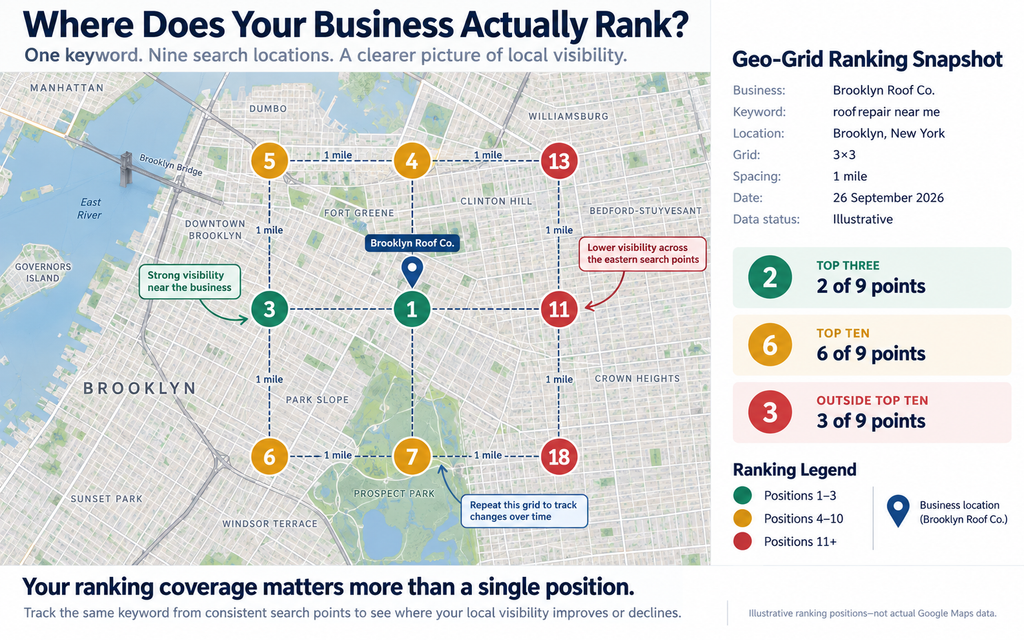
The company ranks first near its location but drops substantially toward the eastern edge. That doesn’t automatically indicate poor optimization; it may reflect distance, competition or a weaker match for searches in those areas.
For meaningful measurements, use the same keyword, geographic grid and comparable search conditions each time. Record the date, device and relevant opening hours so you can interpret changes accurately.
Tools such as Local Falcon’s geo-grid tracking system measure rankings from multiple geographic coordinates, allowing businesses to visualize their local search coverage rather than relying on a single position.
Why Do Competitors With Fewer Reviews Sometimes Outrank You?
A competitor with 60 reviews can outrank your business with 200 because Google doesn’t rank businesses by review count alone. Their location may be closer to the searcher, their primary category may better match the query, or they may have stronger local prominence.
Review Quantity, Star Rating and Recency: What Does the Research Support?
Google confirms that more reviews and positive ratings can improve local rankings. However, review quantity, average star rating and review recency measure different aspects of a business’s reputation. Google’s official local ranking guidance explains the role of reviews in prominence.
The distinction becomes clearer in the Local Falcon study published in January 2026, which analyzed 50.4 million US search results across 1,993 business categories using data collected in Q4 2025.
Among businesses appearing in the local 3-Pack, the median review counts were 79 for roofing contractors, 215 for plumbers and 346 for dentists. These are observed industry benchmarks, not minimum requirements for reaching the top three.
- Star ratings tell a different story: A business with 200 reviews and a 4.8-star rating presents a different reputation profile from one with 200 reviews averaging 3.6 stars. Google’s published guidance recognizes positive ratings as a local ranking consideration, but it does not disclose a minimum rating needed to rank.
- Recency adds another dimension: A business may have accumulated hundreds of reviews over several years but received little recent feedback. Whitespark’s 2026 Local Search Ranking Factors survey rates review recency highly. However, Local Falcon’s study did not measure recency, and Localo’s analysis of review velocity found no consistent ranking pattern based on how frequently businesses received new reviews.
- Recency and velocity are not interchangeable: one measures how recent the feedback is, while the other measures the rate at which reviews arrive. Rather than chasing a universal review target, examine the review profiles of businesses competing for your actual searches.
How to Compare Your Reviews With the Right Local Competitors
If you operate a roofing company in Brooklyn, comparing your reviews with every roofing contractor across New York City tells you little about your immediate competition.
Search for your main service from a location where you want to attract customers. Identify the businesses appearing in the local 3-Pack and check whether they offer comparable services. Repeat this from several relevant search points, since your competitors can change across neighborhoods.
Use the following worksheet to record what you find.
| What to Compare | Your Business | Local Competitor 1 | Local Competitor 2 |
|---|---|---|---|
| Primary GBP Category | |||
| Approximate Distance From Search Point | |||
| Total Google Reviews | |||
| Average Star Rating | |||
| Date of Most Recent Review | |||
| Relevant Website and Local Links |
Tip: Compare businesses appearing for the same keyword at the same search location. Rankings and competitors may differ across neighborhoods.
Compare true peers, as generalists and specialists differ in relevance and demand. Don’t blindly target the highest review count. If competitors with similar review profiles consistently outrank you, investigate other SEO ranking factors before spending more on acquiring new reviews.
What Else Explains a Competitor’s Higher Ranking?
Suppose your business has considerably more reviews than a competitor, but that competitor consistently appears above you for a particular search. Four other factors deserve investigation.
- Proximity: The competitor may be closer to the location from which customers are searching.
- Category relevance: Their primary category may describe the requested service more precisely than yours.
- Business-name relevance: Their genuine business name may contain the searched service, although Google prohibits adding keywords solely to manipulate rankings.
- Website prominence: Relevant links from established websites and other evidence of local recognition may contribute to their prominence.
These factors are not interchangeable. A business with excellent reviews cannot necessarily overcome a major geographic disadvantage, and a closer business won’t always outrank a more relevant competitor.
Compare rankings for the same query from several locations. If the competitor’s advantage disappears when the search moves closer to your business, geography may explain part of the difference. If they consistently outperform you nearby, investigate relevance and prominence more closely.
How to Build a Sustainable, Policy-Compliant Review Strategy
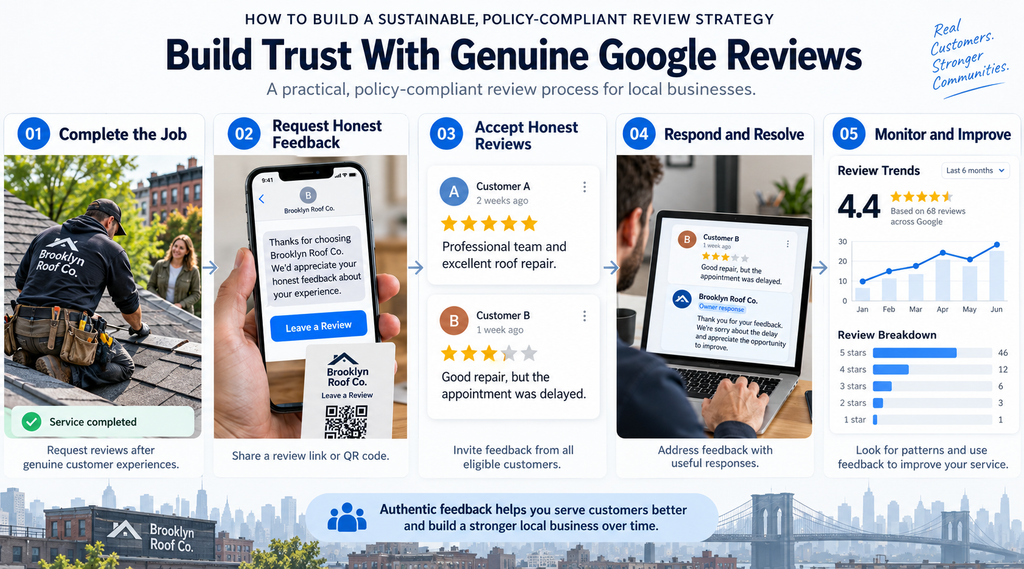
A review strategy should help genuine customers share their experiences without influencing what they say.
Google allows businesses to request reviews through a direct link or QR code. Its Maps content policy prohibits offering money, discounts, free products or services in exchange for reviews. It also prohibits selectively requesting positive reviews or discouraging negative feedback.
Build review requests into normal customer interactions. For example, a contractor can send a review link in a completion email after finishing a job. Ask all eligible customers for honest feedback, rather than contacting only those likely to leave five stars.
Monitor new reviews, address recurring service complaints and respond when you can provide a useful answer or resolve a problem. If a review violates Google’s policies, use the reporting process instead of attempting to suppress legitimate criticism.
A consistent review process supports your reputation and gives prospective customers more recent information. It does not guarantee a particular Google Maps position.
Reviews are only one area where common local SEO advice becomes misleading. Photos, Google Posts, directory citations and review replies present a different challenge: recent studies disagree about how strongly these activities relate to rankings.
Do Photos, Google Posts, Citations and Review Replies Actually Improve Rankings?
You can upload new photos every week, publish regular Google Posts and respond to every customer review without knowing whether any of those activities improved your Google Maps rankings.
The difficulty is that recent research gives conflicting answers. Whitespark’s expert survey and Localo’s September 2026 study of 16,098 Google Business Profiles disagree on several commonly recommended tactics. Localo found strong associations for some activities experts rated relatively low, while others showed no consistent relationship with higher rankings.
Understanding these differences can help you decide where to spend your optimization budget.
Why Experts and Observational Studies Disagree About GBP Photos
Whitespark’s 2026 survey placed Google Business Profile photo quantity at number 96 among its individual local ranking factors. Localo’s observational study, however, found a 25.4-percentage-point difference in top-three ranking frequency between the photo-count groups it compared. Photos ranked second among the nine factors Localo could order by measured association.
Does that mean uploading more photos will improve your ranking? Not necessarily.
An established restaurant may have hundreds of photos because it serves more customers, attracts greater attention and has operated for years. Its higher ranking could reflect several advantages that also explain its larger photo collection.
Google officially recommends adding photos and videos to help customers understand your business, but it doesn’t prescribe a quantity that guarantees better rankings.
Upload clear, genuine images that help customers evaluate your business. A roofing contractor might show completed projects and the types of roofing work offered, while a restaurant might prioritize its food, interior and entrance.
There is little justification for purchasing bulk uploads or repeatedly publishing near-identical images solely to reach a numerical target.
Do Google Posts Improve Rankings, or Are They Mainly Useful for Customers?
Google Posts let businesses publish updates, offers and events directly on their profiles. Their customer-facing purpose is clear, but the independent ranking effect remains uncertain.
Localo found that profiles with at least 10 active posts appeared in the top three for 73% of its tracked observations, compared with 63.7% for profiles without posts. However, publishing more frequently did not produce a consistent additional advantage.
Google’s official guidance on Business Profile posts emphasizes helping customers discover announcements, promotions and events. For example, a restaurant can announce a new menu, while a dental practice can communicate a genuine change to its appointment availability, subject to applicable content restrictions.
Publish when you have information customers need. If an agency promises better Maps rankings simply by posting every day, ask what evidence supports that claim.
Do More Directory Citations Still Make a Difference?
A local citation is a mention of your business on another website, commonly including its name, address and phone number (NAP). Examples include reputable business directories, industry associations and relevant local listings.
Citations can make your business easier to discover and help keep its public information consistent. However, directory quantity and website prominence shouldn’t be treated as the same thing.
Localo observed a 19.9-percentage-point difference in top-three ranking frequency between profiles associated with 21–50 citations and those associated with 1–5. Its data also suggested diminishing associations beyond approximately 20 citations. Crucially, the study did not establish whether those listings were relevant or whether their NAP information was accurate.
For a local contractor, an accurate listing with a relevant trade association may be more useful to customers than dozens of obscure directories.
Start by correcting important business listings and removing conflicting contact information where possible. Then evaluate additional citations according to their relevance, credibility and usefulness not a target directory count.
Editorial mentions and links from reputable local publications deserve separate attention because Google explicitly identifies website links as part of prominence.
Does Replying to Every Review Produce a Ranking Advantage?
Replying to reviews helps prospective customers see how your business handles praise, questions and complaints. That value exists even when no ranking improvement follows.
Localo found that top-three profiles had an average review-reply rate of 73.4%, compared with 76.7% for businesses ranking between positions 11 and 20. Higher reply rates did not consistently accompany better rankings in its dataset.
This doesn’t mean replying hurts rankings. Businesses struggling with their reputation or visibility may simply invest more heavily in responding to feedback.
Google’s review-management guidance recommends useful, relevant responses rather than repetitive acknowledgments. A thoughtful reply to a complaint about delayed service can help future customers understand how the business handles problems.
Respond when you can acknowledge meaningful feedback, answer a question or help resolve a concern. Measure the value of review management through customer trust and service improvements instead of assuming every reply increases rankings.
How Strong Is the Evidence for Behavioral Signals and Keywords in Reviews?
Two claims require particular caution: that customer interactions directly improve rankings and that reviews containing target keywords carry a measurable advantage.
Whitespark’s survey includes behavioral factors such as click-through rates, calls and other interactions. These are practitioner assessments; Google has not disclosed the precise role or weighting of these individual behaviors in its local ranking system.
Keyword-rich reviews have similarly uncertain value. Localo tested several keyword-matching methods against its review data and found a maximum observed difference of just 1.6 percentage points, with most methods showing no positive relationship.
There is no sound basis for coaching customers to include particular service keywords in their reviews. Google explicitly prohibits merchants from requesting specific review content.
Encourage honest accounts of genuine experiences and make your business information useful enough that customers can choose you confidently.
2026 Evidence Ledger: Which Activities Deserve Your Time?
The following table brings the conflicting findings together. It distinguishes Google’s published guidance from the associations reported in recent studies, without treating those associations as proven ranking effects.
| Factor | What the evidence supports | What remains unproven | Practical action |
| GBP photos | Google recommends useful images; Localo observed a strong association between photo count and top-three visibility. | Whether adding a particular number of photos independently improves rankings. | Publish genuine, useful photos of your business, products and services. |
| Google Posts | Google identifies clear customer-information benefits. Localo observed higher top-three frequency among profiles with more active posts. | Whether posting frequency causes rankings to improve. | Share meaningful updates rather than following an arbitrary posting schedule. |
| Directory citations | Localo observed an association between citation count and top-three visibility. | The independent ranking effect of additional listings after accounting for relevance, accuracy and other factors. | Correct important citations and prioritize reputable, relevant sources. |
| Review replies | Google recommends helpful responses, but Localo found no positive ranking pattern based on reply rate. | Whether increasing reply frequency independently improves Maps rankings. | Respond for customer service and reputation, not a guaranteed ranking benefit. |
| Keywords in reviews | Localo found weak or inconsistent associations. | A meaningful independent advantage from including exact-match keywords. | Request genuine feedback without directing customers’ wording. |
| Behavioral signals | Practitioner research considers various interactions potentially important. | Their individual causal effects and precise algorithmic weights. | Make your profile useful and track genuine customer actions; avoid manufactured engagement. |
The practical problem is that optimizing your profile can become an endless list of activities with no clear connection to results. If your business is still struggling to appear in Google Maps after completing these tasks, the next step isn’t necessarily more content or more citations. It’s identifying the specific reason you’re not ranking where your customers are searching.
Your Google Business Profile Is Optimized but Still Not Ranking—What Should You Check?
You’ve selected the right categories, completed your profile and collected genuine reviews, yet your business barely appears on Google Maps. Making more profile edits without identifying the problem could waste time without improving your rankings.
Before changing anything else, find out whether you’re dealing with poor search relevance, geographic limitations, stronger competitors or a profile-related issue. This six-step audit will help you narrow down the cause.
Step 1 — Check Whether You’re Measuring the Right Search and Location
Start by confirming that you’re tracking the searches your customers actually make.
A plumbing company might rank well for its business name but struggle with “emergency plumber near me.” These searches serve different purposes, so ranking for one doesn’t establish visibility for the other.
Check three things:
- Search query: Use service-specific keywords that reflect genuine customer intent. Your Google Business Profile performance report can help identify searches for which your profile has appeared.
- Search location: Check rankings from the neighborhoods where you want to attract customers, not just your office.
- Search results: Distinguish between Google’s local 3-Pack, the full Google Maps results and traditional organic website rankings.
Google’s Business Profile performance report provides search terms, views and applicable customer-interaction metrics, but it doesn’t provide a complete geographic ranking report.
If you’re monitoring local rankings, keep your search locations, keywords and measurement conditions consistent. Otherwise, two searches may produce different results even when your visibility hasn’t meaningfully changed.
Step 2 — Check Relevance Before Making More Profile Edits
If your business struggles to appear even near its actual location, check whether Google has enough accurate information to match it with the intended search.
Suppose you operate an emergency plumbing company, but your primary category is “General contractor.” Your profile may not represent your core activity as precisely as “Plumber.”
Review your primary category, relevant secondary categories and listed services against the searches you want to appear for. Google advises businesses to provide complete, accurate information because it helps match their profiles with relevant searches. Google’s local ranking guidance explains this relationship.
Only change a category when the new selection genuinely describes your business. Adding unrelated categories or repeatedly inserting keywords into your description won’t fix an underlying mismatch between your business and the searcher’s intent.
Step 3 — Separate Geographic Limitations From Competitive Weaknesses
Once you’ve confirmed relevance, examine where your rankings begin to decline.
Run a geo-grid scan for your main keyword across your target neighborhoods. Each point represents a search performed from a different geographic location, allowing you to see where your business appears in the local results.
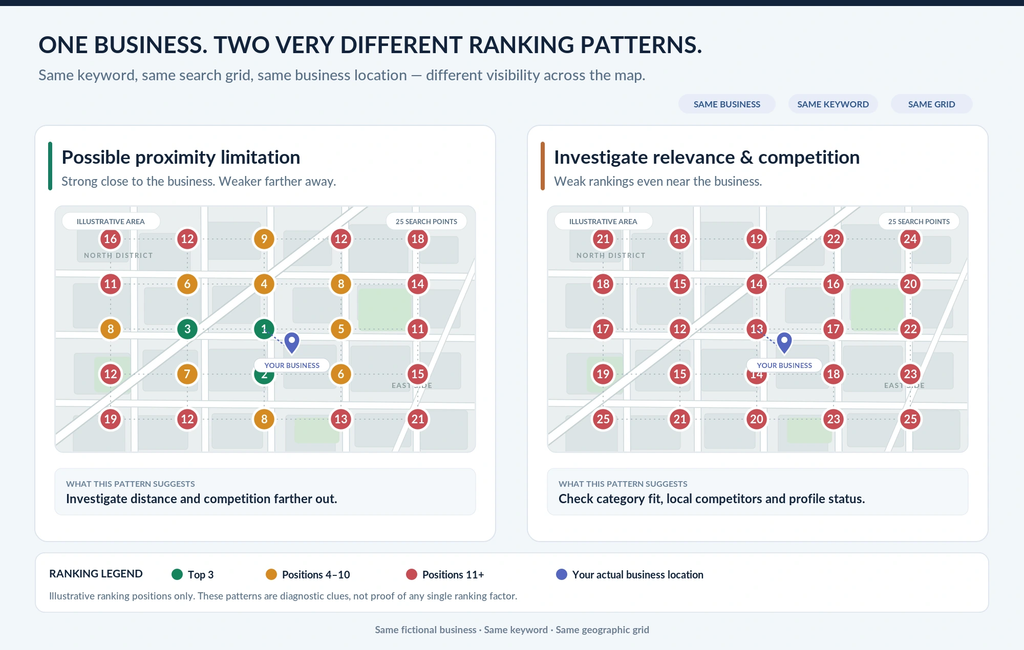
Look for two patterns:
| Ranking pattern | What it may indicate | What to investigate |
| Strong rankings near your business, declining farther away | Proximity or stronger competition in other neighborhoods | Geographic coverage and competitors at the weaker search points |
| Weak rankings even close to your location | Potential relevance, prominence, eligibility or measurement problems | Categories, profile status and nearby competitors |
These patterns are diagnostic clues, not proof of a particular ranking factor. Geo-grid tracking can help visualize rankings across multiple search points.
Step 4 — Audit Comparable Competitors
If another business consistently outranks you in the same search area, investigate what distinguishes it from yours.
Focus on competitors appearing for your exact target keyword at the same search points. Compare their primary categories, distance from the searcher, reviews, websites and relevant local backlinks.
For example, if a nearby roofing contractor ranks above you despite having fewer reviews, examine whether its primary category matches the query more closely or whether established local websites link to it.
Record the differences, but don’t assume every advantage is responsible for its ranking. The objective is to identify a plausible explanation that you can investigate further, rather than copying everything a higher-ranking competitor does.
Step 5 — Investigate Eligibility, Verification and Location-Data Problems
Sometimes the problem isn’t your local SEO strategy but the status or accuracy of your Business Profile.
If your listing suddenly disappears, particularly for searches containing your exact business name, check its verification and restriction status before spending money on further optimization.
Then investigate whether:
- Your business is eligible for the type of profile you’ve created.
- Your address and map pin reflect your genuine location.
- A recent relocation or address edit introduced incorrect information.
- A duplicate profile exists or Google has marked your listing as a duplicate.
Google’s duplicate-profile guidance states that a profile identified as a duplicate won’t appear on Google Search or Maps. Businesses that relocate should update their existing profile rather than create a new one.
If you operate a service-area business without a customer-facing storefront, follow Google’s address-visibility requirements. Don’t create additional profiles for individual services or use virtual offices to manufacture locations.
Resolve genuine profile problems before evaluating whether ordinary ranking optimizations are working.
Step 6 — Choose One Testable Intervention
By this stage, you should have a clearer idea of what’s limiting your visibility. Choose a change that addresses the suspected problem rather than implementing another long checklist.
For example, suppose your business ranks poorly near its location and your primary category doesn’t accurately represent its core service. You could correct that category, document the change and monitor rankings for the same relevant searches.
Record your starting positions, measurement locations and implementation date. Repeat your measurements under comparable conditions, watching for competitor changes and other factors that could affect the results.
Improvement after an edit doesn’t automatically prove the edit caused it. If rankings remain unchanged across repeated measurements, reconsider your original diagnosis before making further changes.
The goal of this audit is to identify the next justified action, not to optimize every available profile field. Once you understand the constraint, the appropriate strategy will also depend on whether you’re managing a storefront, a service-area business or multiple physical locations.
Which Local SEO Strategy Fits Your Business Type?
A restaurant, a home-based plumbing company and a dental chain shouldn’t follow identical Google Maps optimization strategies. Their customers search differently, and Google’s eligibility and address requirements differ for each business model.
Before making further changes, check whether your Google Business Profile reflects how your business actually serves customers.
Storefront Businesses — What Matters When Customers Visit Your Location?
For restaurants, retail stores and other storefront businesses, your physical location is central to local search visibility.
Google requires businesses displaying their addresses to operate at genuine locations with permanent business signage. Your address, map pin and opening hours should accurately reflect where and when customers can visit.
Google’s Business Profile guidelines explain these requirements.
Once those details are correct, investigate nearby competition. A restaurant ranking well within a few blocks but poorly across town may face a geographic limitation rather than a profile-completeness problem.
Compare your rankings with similar businesses using the same search queries and geographic search points. Pay particular attention to locations where your visibility changes.
If you also deliver products or visit customers, your business may qualify as a hybrid business. You can display your genuine storefront address and specify the areas you serve, provided customers can visit your staffed location during its stated hours.
Service-Area Businesses — What Changes When Your Address Is Hidden?
Plumbers, cleaners and mobile repair services often visit customers without operating a public storefront.
If customers cannot visit your business address, Google’s service-area guidelines require you to hide it. You can specify the cities or postal codes you genuinely serve, but these settings don’t establish a guaranteed Google Maps ranking radius.
For example, a plumber based in Brooklyn might serve parts of Queens. Adding Queens to the profile accurately communicates service coverage, but it doesn’t guarantee visibility for every plumbing search there.
For a service-area business struggling with rankings, examine three things: whether its profile complies with Google’s eligibility requirements, whether its categories match its actual services and how its rankings change across the areas it serves.
Don’t create separate profiles for every city. Google permits additional profiles for genuinely separate service-business locations with their own staff and service areas—not virtual offices or locations that exist solely to target local keywords.
Multi-Location Businesses — How Do You Diagnose One Underperforming Branch?
If a dental chain has five clinics but only one struggles to appear in Google Maps, changing every location’s profile may create unnecessary work.
Start with the underperforming branch. Check its verification status, address, primary category, local competitors and rankings around its actual location.
Each eligible, separately staffed location should have its own Business Profile. Google’s guidelines for chains and multiple locations also require consistent business names and categories when branches operate under the same brand and provide the same services.
Create a useful website page for each genuine location, with its actual contact information, opening hours and services. Avoid creating near-identical city pages for places where the business has no physical presence.
Measure each branch separately. Compare local rankings for equivalent searches, but account for differences in population, competing businesses and search geography.
| Business type | First diagnostic check | Measurement approach |
| Storefront | Genuine location, map pin, hours and nearby competition | Geo-grid around the store |
| Service-area business | Eligibility, hidden address, actual services and geographic coverage | Service-specific searches across the areas served |
| Multi-location business | Individual branch accuracy, relevance and local competition | Separate ranking grids and performance reports for each branch |
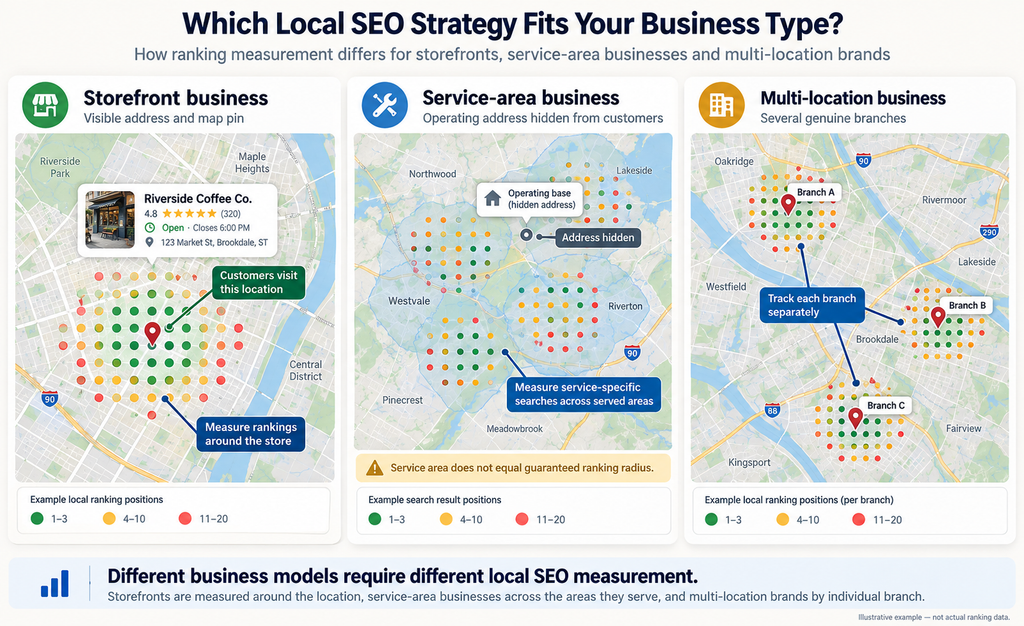
Knowing your business model prevents you from chasing irrelevant optimizations. The next decision is which issue deserves attention first.
What Should You Fix First to Improve Google Maps Visibility?
If your business isn’t appearing where customers search, another round of photos, posts and directory submissions may accomplish little. Your next action should address the specific problem revealed by your audit.
Use the following situation-based action matrix instead of following a universal local SEO checklist.
| Your situation | What to investigate first | Appropriate next action |
| New business with an incomplete profile | Verification, accurate categories and essential business information | Verify your profile and complete the information customers need |
| Ranks nearby but disappears farther away | Geographic coverage and competing businesses | Review geo-grid results before investing in further optimization |
| Competitor with fewer reviews outranks you | Relevance, proximity and prominence | Compare similar businesses at the same search locations |
| Visibility dropped after an address change | Profile status, actual location and map pin | Verify location accuracy and resolve genuine profile issues |
| Rankings improve but qualified leads remain flat | Search intent and customer interactions | Examine relevant search terms, calls, website visits and actual inquiries |
| Several optimizations were implemented together | Unclear attribution | Establish a new baseline and evaluate subsequent changes separately |
If you’re building your local search presence from scratch, start with our local SEO guide for small businesses.
Which Tasks Are Necessary Profile Maintenance Rather Than Proven Ranking Levers?
Not every worthwhile Google Business Profile activity directly improves rankings.
Correcting an inaccurate address, updating holiday hours and maintaining legitimate business information are essential. Google confirms that complete, accurate profiles are more likely to appear for relevant local searches.
Google’s official local ranking guidance establishes the value of profile accuracy.
Photos, posts and review replies also help customers evaluate your business. However, maintaining them doesn’t guarantee an increase in Google Maps rankings.
Distinguish between fixing a problem and routinely maintaining a profile. If your hours are wrong, correct them immediately. If they’re accurate, repeatedly editing them provides no demonstrated ranking advantage.
The same applies to categories. Correcting a genuinely inaccurate primary category addresses a relevance problem; adding loosely related categories merely to capture more keywords risks misrepresenting your business.
What Should You Test When You Have Limited Time or Budget?
Choose the next action based on the strongest evidence from your diagnostic audit.
For a business with weak rankings even near its location, investigate category relevance and nearby competition before purchasing additional citations. If visibility is strong nearby but falls sharply farther away, measure geographic coverage before assuming the profile needs more content.
If rankings have improved but inquiries haven’t, examine whether you’re attracting the right searches. Google’s Business Profile performance reporting includes applicable metrics such as searches, website clicks, call-button clicks and direction requests. A call-button click, however, doesn’t necessarily represent a qualified lead.
Document one specific optimization hypothesis, your starting measurements and the change you make. Repeat comparable measurements afterward, accounting for competitor activity and other possible influences.
The next action should follow the diagnosed problem, not whichever ranking factor happens to be attracting attention. Once you’ve implemented a justified change, the remaining question is whether it improved visibility where your customers search—and whether that visibility produced meaningful business results.
How Do You Know Whether Your Google Maps Rankings Have Actually Improved?
Your ranking report shows that you’ve moved from position seven to three. That’s encouraging, but does it mean more customers can find your business?
Not necessarily. A ranking improvement at one location may have little effect elsewhere. To measure meaningful progress, you need to track where your business appears, which searches bring customers to your profile and whether that visibility generates actual inquiries.
Why a Single Ranking Position Is Not Enough
Searching for your main keyword from your office only shows how your business performs under those particular search conditions. Customers searching from another neighborhood may see different results.
You also need to distinguish between three types of visibility:
- Local 3-Pack: The small group of local business results shown within Google Search for relevant queries.
- Google Maps rankings: Your position in Maps search results, which may differ from the local pack.
- Geographic visibility: How consistently your business appears for the same keyword across multiple search locations.
For example, ranking second near your storefront but outside the top ten in most surrounding neighborhoods tells a different story from consistently appearing in the top three throughout your target area.
Track these separately instead of reporting one ranking position as your overall Google Maps performance.
How to Measure Rankings With a Consistent Geo-Grid
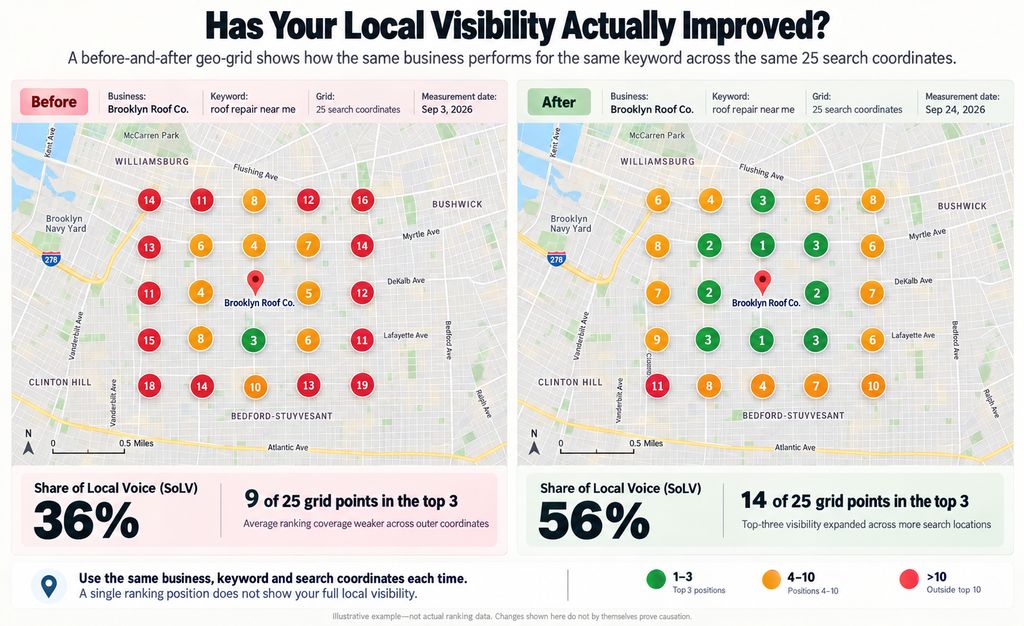
A geo-grid scan checks your ranking for a specific keyword from multiple geographic points. Repeating the same scan allows you to see whether your local search visibility is expanding, shrinking or remaining stable.
Before collecting your baseline, establish the keywords that represent your actual services, the neighborhoods that matter commercially and a grid size appropriate for your market.
Keep the search coordinates, distance between grid points, device settings and search-results surface consistent. Use comparable measurement dates and times, particularly when your business’s opening hours could affect the results.
One useful metric is Share of Local Voice (SoLV), which Local Falcon defines as the percentage of grid points where your business ranks in the top three. Its reports also distinguish average ranking among points where you appear from averages that account for points where your business isn’t found.
For example, if your business appears in the top three at 12 of 25 grid points, its SoLV for that scan is 48%. Repeat the scan under comparable conditions to assess whether its coverage changes.
How to Test Changes Without Mistaking Correlation for Causation
If your rankings improve after changing your primary category, the update may not be the cause. Competitor closures, seasonal demand, Google updates or other SEO activity could also affect results.
Establish a baseline using your target keyword, geo-grid rankings and relevant Google Business Profile metrics. Record the exact change, then repeat measurements under comparable conditions. For multi-location businesses, an unchanged branch can provide a useful comparison, although local market differences still matter.
Treat ranking improvements as evidence, not proof of causation. Stronger conclusions require appropriate controls and repeatable results.
Which Business Profile Metrics Connect Visibility to Customer Actions?
Higher rankings are useful only if they help customers discover and engage with your business. Google’s Business Profile performance documentation identifies several metrics available to eligible profiles, including search terms, profile views, website clicks, call-button clicks, direction requests and completed bookings through supported providers. Not every metric is available to every business.
| Metric | What it helps you understand | What it doesn’t establish |
| Search terms | Which queries triggered your profile’s appearance | Your exact organic ranking for each query |
| Profile views | How many unique people viewed your profile, under Google’s counting rules | How many became customers |
| Website clicks | How often people clicked your profile’s website link | Whether those visitors converted |
| Call-button clicks | How often customers tapped the call button | Whether a call connected or produced a qualified inquiry |
| Direction requests | How often people requested directions | Whether they actually visited |
| Bookings | Completed bookings through supported booking providers | Revenue or attendance without further records |
An important reporting limitation: Google says Business Profile performance can include activity from both organic results and Google Ads. If you’re running paid campaigns, don’t attribute every improvement in profile interactions to organic local SEO.
For a service business, compare call-button clicks with actual answered calls and qualified inquiries recorded in your CRM or call-tracking system. For a restaurant, compare direction requests and supported bookings with whatever reliable customer or sales records you have.
When Should You Stop, Continue or Reconsider an Optimization?
Decide what a useful outcome looks like before implementing a change.
If an accurate category correction is followed by sustained improvement across your target search locations, continue monitoring before making further changes. If repeated measurements show no meaningful difference, review whether your original diagnosis was correct.
Stop a discretionary experiment when the expected benefit isn’t supported by adequate observations, its costs outweigh its demonstrated value or compliance concerns arise. Don’t undo essential accuracy or policy corrections merely because they didn’t produce an immediate ranking increase.
There is no universal waiting period that proves an optimization has succeeded or failed. Allow for the type of change, its implementation status, measurement frequency and normal ranking variation.
Free Google Maps Ranking Measurement Worksheet
Track local rankings across neighborhoods, compare results before and after optimization, and measure qualified leads.
↓ Download Free Ranking WorksheetFree Excel template · No sign-up required
Better measurement also makes it easier to recognize tactics that offer little reliable evidence of a ranking benefit—and those that could put your Business Profile at risk.
Google Maps Ranking Myths and Risky Shortcuts to Avoid
Some local SEO tactics offer little proven ranking value; others risk Google Business Profile suspension. Before investing, separate evidence-backed optimization from misleading shortcuts.
Can Keywords Added to Your Business Name Improve Rankings?
Keywords in business names rank highly in practitioner surveys, but keyword stuffing violates Google’s Business Profile guidelines.
For example, “Smith & Sons” shouldn’t become “Smith & Sons Best Emergency Plumber Brooklyn” unless that’s its genuine business name. Unnecessary service or location keywords risk suspension. Use your real business name and place relevant keywords in your categories and service descriptions.
Do Geotagged Photos or Daily Google Posts Guarantee Better Rankings?
No. Neither tactic guarantees higher Google Maps rankings.
A 10-week Search Engine Land study found improvement in only one of seven measurement comparisons after photo geotagging; the others showed no benefit or declining rankings.
Similarly, Localo’s 2026 study of 16,098 profiles found an association between Google Posts and higher rankings, but no consistent additional advantage from posting more frequently.
Publish genuine business photos and useful updates rather than following arbitrary upload schedules.
Will More Service Areas, Additional Listings or Virtual Offices Help You Rank in More Cities?
Adding cities to your service area doesn’t guarantee rankings there. Google permits up to 20 service areas, but these describe your service coverage, not your ranking radius.
Google’s eligibility guidelines prohibit listings for virtual offices where businesses don’t genuinely operate. Separate service-business locations require their own staff and service areas.
If you’re expanding geographically, evaluate your actual ranking coverage before creating additional profiles. Only establish listings for eligible business locations.
Do Paid Google Ads Improve Your Organic Google Maps Position?
No. Google confirms that businesses cannot pay for better organic local rankings.
Google Ads can increase paid visibility through Maps ads and promoted pins, but these placements don’t directly improve organic rankings.
When evaluating agency performance, distinguish paid interactions from organic growth. Increased profile views or calls during an advertising campaign don’t automatically indicate better local SEO performance. Track rankings, paid activity and qualified leads separately using your Google Maps performance measurements.
Frequently Asked Questions
1. How Long Does It Take for Google Maps Rankings to Change?
Google says profile edits may take up to three days to appear, while new businesses can take up to a month to establish rankings. Neither guarantees improvement. Measure your rankings consistently before evaluating changes.
2. Can You Rank in a City Without a Physical Storefront?
Yes. Eligible service-area businesses can rank outside their operating location, but adding service areas doesn’t guarantee visibility. Distance, relevance and prominence still apply.
3. Does Google Business Profile Verification Improve Rankings?
Verification enables your business information to appear on Google Search and Maps but doesn’t guarantee higher rankings. Google notes that new businesses may take up to a month to establish rankings.
4. Can a New Business Outrank an Established Competitor?
Yes. Better search relevance or proximity can help a newer business rank higher. Google also considers prominence, including reviews and links, so business age and review count alone don’t determine rankings.
5. Are Google Maps and Local Organic Ranking Factors the Same?
No. Google Maps rankings consider relevance, distance and prominence, while organic results use broader Google Search ranking systems. Some signals overlap, but strong organic rankings don’t guarantee Google Maps visibility.
Conclusion: Turn Google Maps Visibility Into Real Customers
Improving Google Maps rankings starts with identifying what’s holding your business back, not following another SEO checklist. Focus on relevance, proximity and prominence, then address gaps in your profile, local competition and geographic visibility. Measure success through qualified leads, not just ranking positions.
Still struggling to reach nearby customers? Stop guessing and start making changes that matter. Explore Rank N Convert’s local SEO services to uncover your ranking barriers, strengthen your local presence and turn searches into customers.