

Your business appears on Google Maps near your shop but disappears a few streets away. Do you need a rank tracker, a Business Profile audit, or both? Google says local visibility depends on relevance, distance, and prominence, while Google Business Profile is free. Paying for local SEO software only makes sense when it solves a specific problem.
This guide compares 15 local SEO tools, from free options to specialist platforms, examining their features, costs, and limitations. You’ll discover which tools fit your needs and where a subscription might simply waste your money.
Which Local SEO Tool Do You Actually Need? Quick Comparison of All 15
Prices checked September 27, 2026. All prices are in USD. Annual-billing rates are identified; taxes and optional add-ons may apply.
| Tool | What it’s for | Suitable user | Free or paid | Starting price | Main limitation |
| 1. Google Business Profile | Manage business information, categories, hours, photos, posts and reviews on Google Search and Maps. | Local business owners | Free | $0 — Google’s official service. | Doesn’t independently track Maps rankings across multiple neighborhoods. |
| 2. Google Search Console | Monitor organic search queries, clicks, impressions, indexing and website performance. | Business owners, website managers and SEO professionals | Free | $0 — Google’s free service. | Measures website search performance, not Google Maps geo-grid rankings. |
| 3. GMB Everywhere | Audit Business Profiles and investigate competitors’ categories, services, reviews and posts directly in Google Maps. | Freelancers and local SEO consultants | Freemium | Free limited plan; paid from $30/month or $180/year per user. | Free audit allowances are small; paid licences cannot be shared between users. |
| 4. PlePer | Investigate GBP data, identify duplicates, research competitors and monitor profile changes. | Technical SEO consultants and agencies | Free tools + paid plans | $18/year for one monitored business; professional plans from $10/month. | Requires technical interpretation; its Local Rank Tracker isn’t suitable for service-area businesses. |
| 5. Localo | Follow guided GBP optimization tasks, monitor competitors and track local visibility. | Business owners, freelancers and small agencies | 14-day trial | $49/month or $39/month billed annually for one business. | Agency plans allow more monitored profiles than profiles receiving full optimization features. |
| 6. Local Falcon | Measure Google Maps rankings across geographical grids and compare local competitors over time. | SEO specialists and agencies | 100 trial credits | $24.99/month for 7,500 credits. | Credit consumption grows with grid size, keywords, locations and scan frequency. |
| 7. Grid My Business | Track Maps rankings with customizable grid points, scheduled scans and competitor comparisons. | Local businesses and agencies | Freemium | Free Starter with 250 scan credits; paid from $29/month or $290/year. | Scan credits and reporting history depend on the plan. |
| 8. Whitespark | Track local rankings, research citation opportunities and purchase separate citation-building services. | Consultants and local SEO agencies | Free trials and limited tools | Rank Tracker from $14/month billed annually; geo-grids from $10/month. | Rank tracking, geographical grids, citation research and citation building are purchased separately. |
| 9. Local Viking | Schedule GBP content, manage multiple profiles and monitor local rankings through GeoGrid scans. | Agencies and multi-location businesses | Paid | Approximately $39/month for one listing, based on August 2026 pricing. | Separate keyword and GeoGrid credit pools; current checkout pricing needs reconfirmation. |
| 10. BrightLocal | Combine local rank tracking, geo-grid reports, GBP audits, citation monitoring and client reporting. | Freelancers and agencies | 14-day trial | Track: $41/month for one location, or $369/year. | Listing synchronization and reputation tools require higher plans; Citation Builder costs extra. |
| 11. Semrush Local | Automate GBP management, track Maps rankings and distribute listings on eligible plans. | Businesses and agencies using Semrush | Paid | Base: $30/location/month, billed annually; Pro: $60/location/month. | Listings management requires Pro; other Semrush SEO toolkits cost extra. |
| 12. Moz Local | Synchronize business listings, detect inconsistencies and monitor reviews and local visibility. | Businesses with one or several locations | Paid | Lite: $20/location/month or $199/year. | Designed around supported US, UK and Canadian markets; costs increase per location. |
| 13. Yext | Govern location data and distribute approved information across a large publisher network. | Franchises and enterprises | Custom quote | Contact sales; no universal public platform price. | Contract costs, publisher coverage, implementation and data-exit terms need individual verification. |
| 14. Uberall | Coordinate multi-location listings, customer reviews, local publishing and reporting. | Multi-location brands and enterprises | Custom quote | Quote-based packages. | Reviews, social publishing and advanced analytics depend on the purchased package. |
| 15. AgencyAnalytics | Consolidate local SEO and marketing data into automated, branded client reports. | Freelancers and agencies | 14-day trial | $20/client/month, billed annually. | Doesn’t replace the underlying SEO tools; built-in rank tracking costs extra. |
Which Local SEO Tools Can You Use for Free Before Paying?
Before buying local SEO services software, check what you can’t already do for free. Google’s tools may cover the essentials for one business, while an agency managing 20 locations may need paid software to automate monitoring and reporting.
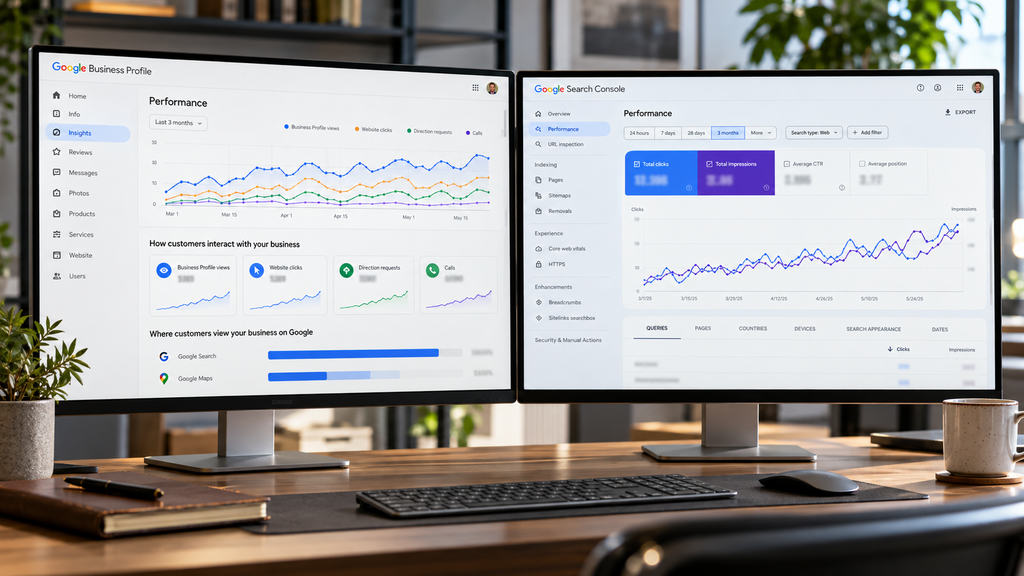
Start With Google Business Profile and Search Console
Two free local SEO tools should form your starting point:
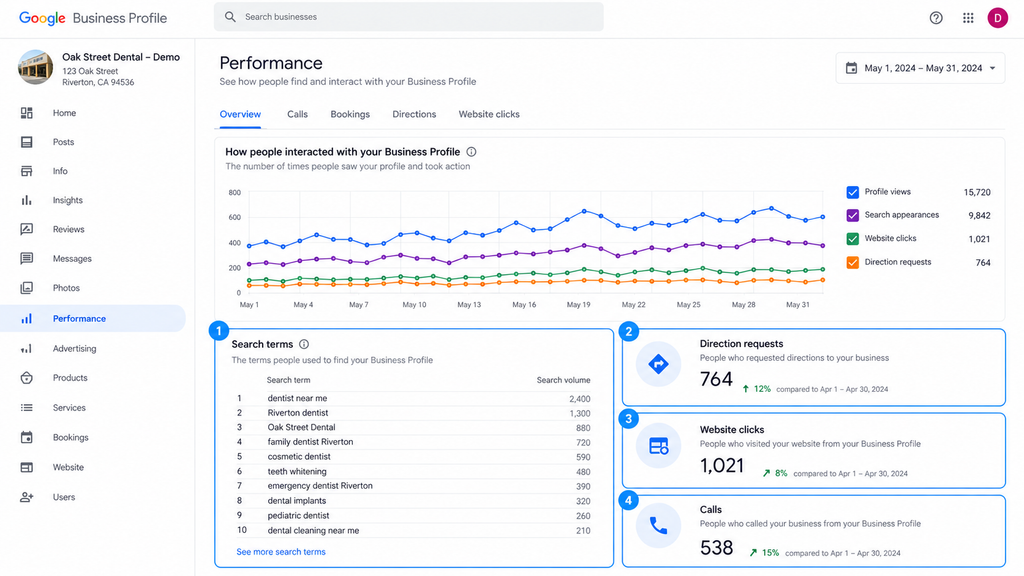
- Google Business Profile manages how your business appears on Google Search and Maps. Update your categories, services, contact details, photos and opening hours. Its Performance report shows search terms, profile views, website clicks and direction requests.
- Google Search Console measures your website’s organic search performance. Discover which queries generate impressions and clicks, identify your most visible pages and investigate indexing problems.
For example, a plumber can use Search Console to identify searches bringing visitors to a service page, then check whether their Business Profile accurately describes those services.
Neither tool provides neighborhood-by-neighborhood Google Maps rankings. Search Console’s average position measures website search visibility, not your Business Profile’s geographical ranking.
For occasional competitor research, try BrightLocal’s free Local SERP Checker. It displays Google Search and Maps results from a chosen location. Its usage guidelines allow 10 free searches daily without a paid subscription.
When should you pay? When occasional checks become recurring rank tracking, multi-location management or time-consuming client reporting.
Which Local SEO Tasks Actually Require Paid Software?
Paid local SEO tools become worthwhile when free tools cannot provide the data you need or manual work starts consuming too much time. The deciding factor is how often you perform a task, not how many features a subscription offers.
Google Maps ranking or its tracking is one example. A search from your business address won’t reveal how your rankings change across nearby neighborhoods. A geo-grid tracker like Local Falcon measures keyword positions from multiple geographical points and supports recurring scans to monitor local search visibility.
Paid software can also help with three recurring tasks:
- Multi-location management: Update business information, monitor reviews and compare performance across several Google Business Profiles without managing every location separately.
- Local citation management: Find inconsistent business details and synchronize listings across relevant directories when addresses, phone numbers or opening hours change.
- Automated client reporting: Combine local rankings, Business Profile interactions and website SEO analytics into scheduled reports without repeatedly exporting data.
However, not every task justifies a subscription. Correcting a handful of directory listings once may be cheaper than paying for ongoing citation management.
Before upgrading, identify what your free local SEO tools cannot accomplish, how frequently you’ll need the additional functionality and which business decision it will support. That will help you choose software based on an actual requirement rather than paying for overlapping features.
15 Local SEO Tools Compared by What They Actually Do
The first two tools worth understanding are Google’s own platforms. One manages the business information customers see on Search and Maps; the other reveals how Google discovers, indexes and displays your website. Both are free, but they solve different parts of local SEO.
Free Tools for Local SEO Fundamentals
1. Google Business Profile — Manage Your Local Presence for Free
Google Business Profile (GBP) is Google’s free platform for managing a business listing on Search and Maps. It lets you maintain essential business details, manage customer reviews and see how people interact with your profile.
For a local business, the immediate benefit is practical: customers can find the correct opening hours, contact information and services without having to visit your website first.
Core features
- Business information: Update your address or service area, phone number, website, opening hours, photos and services.
- Business categories: Choose a primary category and relevant secondary categories that accurately describe your business. Google’s category guidelines recommend specific categories that describe what the business is, rather than adding categories simply to target more keywords.
- Review management: Read and respond to customer reviews. You can also share a review link or QR code to request genuine feedback, but Google’s review policies prohibit offering incentives in exchange for reviews.
- Performance tracking: Monitor profile searches, views and customer actions through the Performance dashboard.
Key reports and what they tell you
| Metric | What you can learn |
| Search terms | Which queries caused your profile to appear |
| Profile views | How many people viewed your listing on Search or Maps |
| Direction requests | How often people requested directions to your business |
| Website clicks | How many times people clicked your profile’s website link |
| Calls | How often people clicked your profile’s call button |
These figures have important limits. Search-term data is updated monthly, and the call metric counts button clicks, not completed conversations. Google’s Business Profile performance documentation also states that performance data can include activity from organic results and Google Ads.
A practical way to use it
Start by checking the information that affects a customer’s next action: your primary category, services, address or service area, phone number and hours. Then review the search terms and customer interactions available in Performance.
For example, a home-based plumbing business should check that its service area is configured correctly and its residential address is hidden. Google’s service-area business guidelines explain when an address must be hidden and how these profiles should represent their operating area.
What it cannot do
Google Business Profile does not provide independent geo-grid rank tracking. You cannot use its Performance dashboard to determine whether your listing ranks third near your premises but fifteenth several neighborhoods away.
Who should use it?
Every eligible local business should establish and maintain its own profile. For one location, it may cover your essential listing-management needs without an additional subscription.
2. Google Search Console — Understand Your Website’s Local Search Performance
Google Search Console (GSC) shows how your website performs in Google Search and helps you diagnose problems that may prevent important pages from appearing in results.
For a local business, its value goes beyond checking keyword positions. You can discover which service-related searches generate visibility, identify underperforming landing pages and investigate whether Google can index new or updated content.
Core features
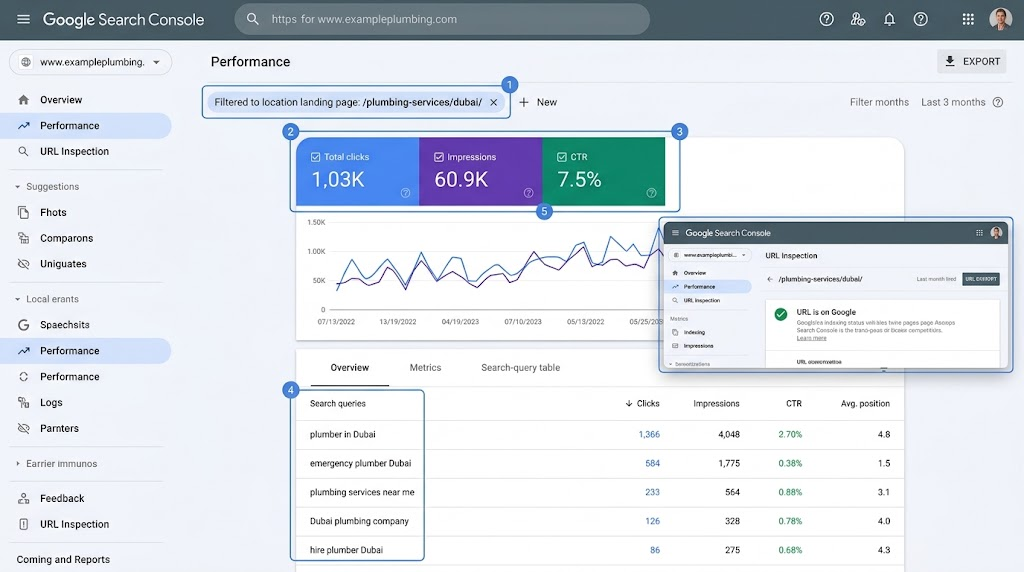
- Search performance: Measure clicks, impressions, click-through rate (CTR) and average position. Filter results by query, page, country, device or date.
- Page indexing: Identify indexed and non-indexed URLs, including service pages and location-specific landing pages.
- URL Inspection: Check Google’s indexed version of a page, inspect its crawl status, identify the Google-selected canonical URL and test its current accessibility.
- Sitemap submission: Submit your XML sitemap and check whether Google could process it.
- Technical monitoring: Investigate Core Web Vitals, security issues and manual actions that may affect your website.
Key reports and when to use them
| Report | What it helps you investigate |
| Performance | Which local search queries and landing pages generate impressions and clicks |
| Page Indexing | Why important service or location pages are not indexed |
| URL Inspection | How Google crawled a particular page and which canonical URL it selected |
| Sitemaps | Whether Google successfully fetched and processed your submitted sitemap |
| Core Web Vitals | Which URL groups have poor loading speed, responsiveness or visual stability |
| Manual Actions and Security Issues | Whether Google has identified policy violations or security threats |
The Core Web Vitals report uses real-user performance data and may exclude pages without enough data. Likewise, submitting a sitemap helps Google discover URLs but does not guarantee crawling or indexing.
A practical way to use it
Suppose a cleaning company has dedicated pages for deep cleaning, office cleaning and end-of-tenancy cleaning, but its office-cleaning page attracts very little organic traffic.
Instead of immediately rewriting the page, investigate it in this order:
- Open the Performance report and filter by the page URL. Check which queries generate impressions and clicks.
- Compare those queries with the service the page is intended to promote. A mismatch may indicate that the page does not adequately answer the searches for which it appears.
- If the page receives no impressions, use URL Inspection to check whether Google has indexed it and selected the intended canonical URL.
That distinction prevents you from treating every traffic problem as a content problem. A page that Google cannot index requires a different response from an indexed page that attracts impressions but few clicks.
What it cannot do
Search Console reports website performance in Google Search; it is not a Google Maps geo-grid tracker. Its average position is calculated across recorded search impressions, so it cannot establish your Business Profile’s ranking at individual points across a city.
It also cannot guarantee that a page will enter Google’s index. Even a successful live URL Inspection test confirms only that the page passes the conditions checked by that test.
Who should use it? Any local business with a website, particularly one publishing service pages, city landing pages or local SEO content. Search Console should be part of the initial setup before purchasing additional software to investigate organic search performance.
Local SEO Audit and Google Business Profile Optimization Tools
Before changing your Google Business Profile for optimization, find out what information your competitors display and where your own listing may be incomplete. GBP audit tools bring categories, services, reviews and other profile details into one place, making competitor research much easier.
3. GMB Everywhere — Audit Profiles and Research Local Competitors
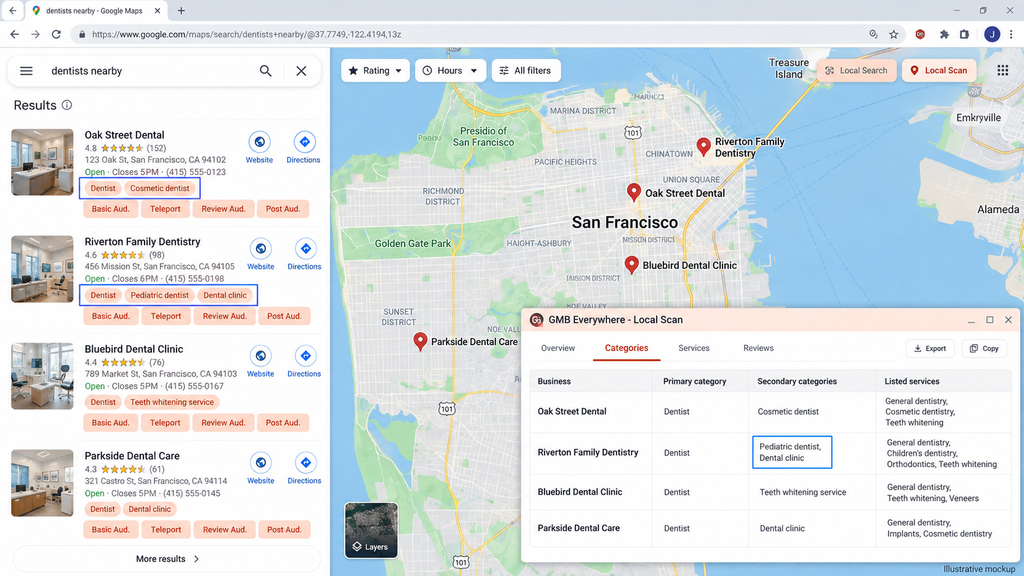
GMB Everywhere is a browser-based local SEO tool that lets you inspect Google Business Profiles directly from Google Maps. Its main advantage is showing information that would otherwise take several manual searches to collect, particularly competitors’ primary and secondary business categories.
Unlike a full local SEO management platform, it focuses on researching and auditing profiles rather than managing all your business listings from a central dashboard.
Key features
| Feature | What you can do with it |
| Category Finder | Discover related GBP categories and associated services to investigate for your business. |
| Basic Audit | Inspect a profile’s categories, services, attributes, Place ID, CID and other publicly available information. |
| Local Scan | Compare nearby competitors’ categories, services, reviews and location-related information in one report. |
| Review Audit | Analyze rating trends, review recency, recurring terms and customer feedback. |
| Post Audit | Examine competitors’ posting frequency, content strategy and use of links or media. |
| Rank Check | Check where a business appears for a keyword from selected geographical points. |
| Website Audit | Compare a GBP-linked website’s business information with its associated profile. |
These capabilities are documented in the official feature overview and the vendor’s August 2026 product update. The latter introduced a multi-point Rank Check and Website Audit, so older reviews describing the extension as only a category-checking tool are incomplete.
How to use it for competitor research
Consider a dental clinic researching the businesses appearing for a particular treatment in its neighborhood.
- Open the relevant Google Maps search and inspect competing listings’ primary and secondary categories.
- Run Local Scan to compare the competitors’ categories, listed services and review profiles.
- Use Basic Audit to examine the listings that appear relevant to your clinic’s actual services.
- Check your own website and Business Profile for missing or inconsistent information before making changes.
The important distinction is that competitor data suggests what to investigate. A category or service should only be added when it accurately describes your business, regardless of what a competing profile displays.
Pricing: What’s free, and when do you need to upgrade?
According to GMB Everywhere’s official pricing page, the following plans were listed in September 2026.
| Plan | Price | Usage |
| Free | $0 | Five combined monthly views across audits, Rank Check, Category Finder and AI tools |
| Power User | $30/month | Unlimited advertised audits, category research, rank checks and Local Scan views |
| Power User Annual | $180/year | Same advertised unlimited access, equivalent to $15/month |
There is an important catch with the free plan: Local Scan and Website Audit each have a separate allowance of five total views per user, not five new views every month. Viewing competitors’ primary and secondary categories directly in Google Maps remains free.
Paid subscriptions are licensed per user, and applicable taxes are additional. An agency with several employees should therefore calculate its cost by the number of people needing access, not just the number of client profiles.
What do users say?
The Chrome Web Store listing shows a generally positive reception, with recent indexed snapshots reporting approximately 4.6–4.7 out of five stars from more than 110 ratings. The extension is also listed with around 300,000 users, although these figures change over time.
Its appeal is the ability to inspect categories and run audits without continually switching between Google Maps and separate research dashboards. The trade-off is that it adds controls to the browser interface, and learning which audit to run takes some familiarity. Public feedback also includes questions about default search settings and free usage consumption; individual reviews should not be treated as evidence of widespread problems.
Where does GMB Everywhere fall short?
Its strength is finding information, not implementing every local SEO task. It won’t automatically correct your listings across external directories, and its audit findings still require someone who understands Google Business Profile guidelines.
The extension’s multi-point Rank Check is useful for geographical spot checks. However, buyers needing scheduled scans, long-term geo-grid history or particular reporting exports should verify those capabilities before replacing a dedicated rank-tracking platform.
Because it is a browser extension, also review its permissions and privacy policy before installing it on an agency-managed browser. Its Chrome Web Store listing discloses handling of personal information, location and website content.
Any Alternatives:
- GMBspy is a narrower alternative for checking competitors’ business categories. It can also export category information for the top 20 local search results, making it relevant when category discovery is your main requirement.
- PlePer offers broader GBP analysis and ongoing monitoring, including listing changes, reviews and duplicate checks. Its published plans include a single-business option, so it is worth comparing when continuous profile monitoring matters more than occasional browser-based research.
When is GMB Everywhere worth paying for?
The free version is a sensible starting point for occasional competitor checks. A paid plan becomes relevant when you regularly audit profiles, compare several competitors or investigate different search locations for multiple clients.
If your main task is simply checking competitors’ categories, start with the permanently free category display before buying the full subscription.
4. PlePer — Investigate Business Profiles and Local Search Data
PlePer is a local SEO research platform for examining Google Business Profiles, comparing nearby competitors and monitoring changes to listings. It goes deeper than a basic profile checker, bringing together business categories, review activity, duplicate listings and technical details that are useful during an SEO audit.
Its strength is helping you investigate a problem. It provides the data, but you still need to determine which findings deserve action.
Core features
| Feature | What it helps you investigate |
| GBP audits | Business categories, services, products, attributes, opening hours, posts and review activity. |
| Competitor analysis | Differences between nearby listings, including review frequency, owner responses and services offered. |
| Profile monitoring | Changes to names, addresses, phone numbers, websites, categories and hours, plus new reviews and Google Q&A activity. |
| Duplicate detection | Potential duplicate listings that need further investigation. |
| Category research | Available Google Business Profile categories by country and language, including related categories. |
| Local rank tracking | Google Maps positions for selected keywords across multiple geographical points. |
| Chrome extension | Quick access to listing details, categories, identifiers and local search-result comparisons. |
PlePer also provides specialist utilities such as a review-link generator, CID converter and a separately billed GBP Scrape API.
How would you use PlePer for a local SEO audit?
Imagine you’re auditing a restaurant whose competitors consistently appear in Google Maps results for a particular cuisine.
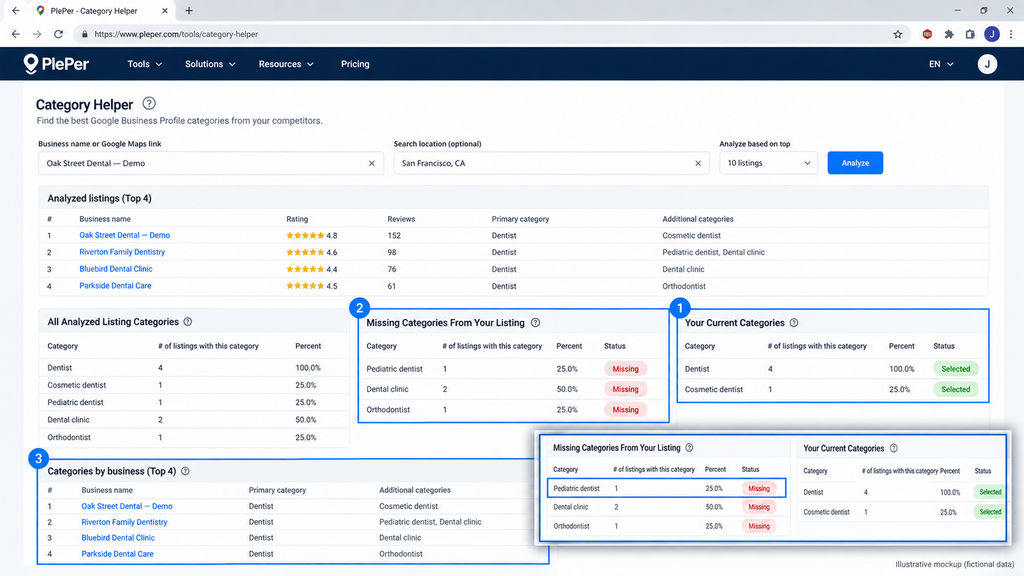
Start with PlePer’s Category Helper. Enter the restaurant and up to three relevant search terms. The tool compares categories used by nearby listings and identifies categories absent from your selected profile. You can then examine competing restaurants’ services, recent reviews and other profile information.
The useful outcome is a list of possible issues to investigate, not an instruction to copy competitors. A category that appears frequently in nearby results may still be inappropriate for your business.
Pricing and free access PlePer’s official pricing page lists the following plans. Prices were checked in September 2026.
| Plan | Published price | Listings monitored | Listings analyzed |
| Single Business Owner | $18/year | 1 | 40 |
| Local Pros | $10/month | 10 | 300 |
| Local Agencies | $25/month | 50 | 1,000 |
| The Big Guys | $150/month | 500 | 10,000 |
The difference between monitored and analyzed matters. An agency on the Local Pros plan can research 300 listings but continuously monitor only 10.
Monitoring frequency also varies. The Single Business Owner plan checks profile changes every two days and new reviews daily. The Big Guys plan checks profile changes daily and reviews twice daily.
You can register for a trial without payment details, and PlePer offers free individual utilities and a Chrome extension. However, the main monitoring platform isn’t permanently free: when the trial expires, monitored listings become inactive unless you subscribe. Some individual tools also have daily usage limits.
What do users say?
Feedback on PlePer is mixed, and it’s important to distinguish the free browser extension from the paid monitoring platform.
Its Chrome Web Store listing showed a 2.9/5 rating from approximately 50 ratings in the September 2026 research snapshot. One April 2026 Reddit user reported completing their task with PlePer’s free tools but also experiencing occasional downtime.
Meanwhile, a September 2026 practitioner discussion included a positive account of using PlePer to investigate competitors’ categories and reviews.
These are individual experiences, not a measured reliability study. The browser extension’s rating should not be treated as a rating of the entire paid platform.
Advantages and limitations
| Advantages | Limitations |
| Detailed GBP and competitor data supports investigative audits. | Requires local SEO knowledge to turn findings into appropriate changes. |
| Monitors profile changes, reviews and potential duplicates. | Monitoring frequency and listing allowances vary by plan. |
| Offers low-cost entry and free specialist utilities. | Individual tools have usage limits; the main monitoring service requires a subscription after its trial. |
| Includes a geographical Maps rank tracker. | PlePer says its Local Rank Tracker is unsuitable for service-area businesses. |
The last limitation is particularly important for agencies managing plumbers, mobile cleaners and similar businesses. Verify that the tracking method supports your client’s business model before making it part of your reporting workflow.
Alternatives to consider
GMB Everywhere is worth comparing when browser-based category research and occasional profile audits are your main requirements. Localo provides a different approach for businesses that want audit findings translated into recurring optimization tasks.
Who should use PlePer?
PlePer suits local SEO consultants, technically confident business owners and agencies that regularly investigate competitor profiles or monitor listing changes. Its paid plans make more sense when those audits and alerts are recurring work, rather than something you need for a one-off category check.
5. Localo — Guided Local SEO Management and Monitoring
Localo combines Google Business Profile auditing, local rank tracking, competitor monitoring and content management in one workspace. Its main distinction is that it turns audit findings into recurring tasks, helping business owners decide what to work on rather than leaving them to interpret a long technical report.
This makes it relevant to businesses that want to manage local SEO themselves and agencies responsible for maintaining several client profiles.
Core features
| Feature | What it helps you accomplish |
| GBP audit | Run automated profile checks and identify improvement opportunities by priority. |
| Smart Tasks | Follow weekly recommendations based on your profile, selected keywords and competing businesses. |
| Local rank tracking | Monitor keyword positions and use configurable Position Maps to examine geographical visibility. |
| Competitor monitoring | Follow changes to competitors’ Business Profiles and compare their activity with yours. |
| Content and reviews | Create and schedule Google Posts, manage reviews and draft AI-assisted responses. |
| Citation management | Identify directory opportunities and organize business-listing information. |
| Agency reporting | Generate client reports, manage team access and publish content across multiple profiles. |
Its audit system performs 17 automated checks covering areas such as categories, opening hours, photos, reviews and business descriptions. Localo converts the results into an Audit Score and prioritized recommendations. Importantly, Localo’s own documentation confirms that this is a proprietary profile-quality score, not a ranking score issued by Google.
How would you use Localo for ongoing optimization?
Consider an agency managing three barbershops in different neighborhoods.
After connecting each Business Profile, the agency can monitor selected keywords, inspect geographical ranking maps and review each location’s audit. Smart Tasks then provide a weekly worklist, such as reviewing incomplete profile information or updating relevant business content.
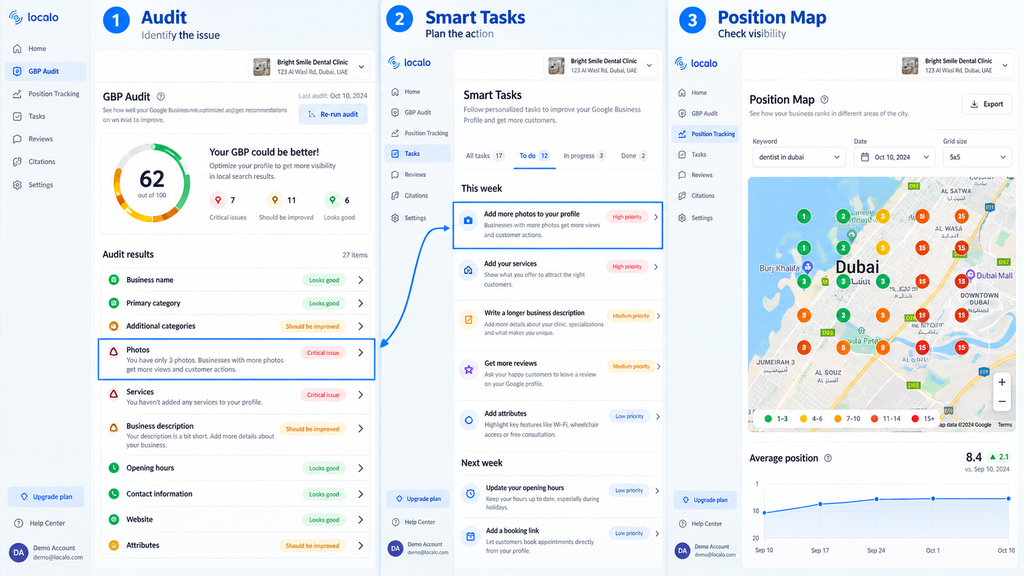
The agency can assign the work, schedule posts, manage incoming reviews and report on changes in local visibility from the same workspace. Localo’s Smart Tasks documentation explains how recommendations use profile information, monitored keywords and competitor activity.
That workflow is useful, but the recommendations still need checking. A suggested category must describe the real business, and an AI-generated post or review response should accurately reflect what the business can offer.
Pricing and free access
Localo’s official pricing page displays these offers in the September 2026 research snapshot. The Pro price shown below applies to the displayed 60-profile configuration; smaller Pro configurations have separate pricing in the site’s interactive selector.
| Plan | Published monthly price | Annual-billing offer | Profile allowance |
| Single Business | $49/month | $39/month equivalent | 1 profile with Optimization |
| Pro — displayed configuration | $169/month | $149/month equivalent | 60 monitored; up to 30 optimized |
| Enterprise | Custom quote | Custom quote | Configured to requirements |
VAT may apply. Localo offers a 14-day trial without requiring a credit card and advertises a 30-day money-back guarantee for eligible payments. Its separate free Local Rank Checker does not provide permanent free access to the full management platform.
There is a crucial distinction for agencies: monitoring a profile and optimizing it are different plan entitlements.
For example, the Pro plan documentation specifies:
| Pro configuration | Monitored profiles | Profiles with Optimization |
| Pro 10 | 10 | 5 |
| Pro 30 | 30 | 15 |
| Pro 60 | 60 | 30 |
| Pro 120 | 120 | 60 |
Monitoring includes rankings, visibility and statistics. Optimization adds audits, weekly tasks, the AI Agent and business-directory management. Pro users also have monthly allowances for Visibility Scan and Leads Finder, which share the same research quota.
An agency managing 30 clients should therefore calculate how many actually require the complete optimization workflow before selecting its plan.
What do users say?
Localo’s G2 reviews showed a 4.9/5 rating from 140 reviews in the indexed snapshot examined for this research. Reviewers frequently mention its accessible interface, straightforward setup and organized task management.
The critical feedback identifies several things worth testing. Individual reviewers have reported keyword-saving problems, discrepancies between map data and their Google Business Profile statistics, limited integrations and AI-generated review responses that sometimes lack customer-specific detail. Those reports do not establish how frequently the problems occur.
Practitioner preference also varies. In a May 2026 Reddit discussion, one user reported using Localo for client Google Maps work, while another liked its trial but preferred BrightLocal’s workflow after years of using it.
This is a useful reminder to evaluate the tasks you perform most often rather than choosing solely from review scores.
Advantages and limitations
| Advantages | Limitations |
| Turns audit findings into prioritized weekly tasks. | Some recommendations require additional context or may already have been completed. |
| Combines audits, rankings, content, reviews and reports. | Agencies must account for separate Monitoring and Optimization allowances. |
| Configurable Position Maps support geographical visibility analysis. | Reviewers have reported occasional map-data and keyword-tracking inconsistencies. |
| Automated reports and team access reduce repetitive client administration. | Advanced research has plan-specific quotas, and some integrations or workflows may require other software. |
Localo’s Audit Score also needs careful interpretation. Improving it means the profile meets more of Localo’s assessed criteria; it does not establish that the business will achieve a particular Google Maps ranking.
Alternatives to consider
PlePer is relevant when your priority is detailed competitor research, listing-change monitoring and technical GBP analysis rather than a guided weekly workflow. GMB Everywhere offers another route for browser-based category and competitor research.
BrightLocal is worth comparing when a larger share of your work involves local rank tracking, citation services and client reporting. Compare the actual plan allowances and separately billed functions before purchasing overlapping subscriptions.
Who should use Localo?
Localo suits business owners who want structured guidance and agencies that regularly handle profile optimization, posts, reviews and client reporting. It becomes more useful when the team will complete its recommended tasks consistently.
If you only need occasional competitor audits, its broader management subscription may be unnecessary. Start with the trial, connect a real profile and check whether the recurring workflow genuinely replaces tasks you’re currently doing by hand.
Google Maps Rank Tracking and Geo-Grid Tools
Ranking first on Google Maps near your business doesn’t mean you’ll appear first across the city. Geo-grid tools check your position from multiple locations, showing where visibility drops, which competitors appear and how those results change over time.
6. Local Falcon — Measure Google Maps Visibility Across a Geographic Area
6. Local Falcon — Measure Google Maps Visibility Across a Geographic Area
Local Falcon is a geographical rank tracker that measures local search visibility from multiple points on a map. Instead of reporting one keyword position for an entire city, it shows where your business appears for a particular search and where competitors take its place.
Its geo-grid reports are especially useful for businesses serving several neighborhoods and agencies that need to explain changes in local visibility to clients.
Core features
| Feature | What it helps you do |
| Geo-grid rank tracking | Check keyword rankings across grids ranging from 3×3 to 21×21 points, using a configurable scan radius. |
| Competitor Reports | Identify businesses appearing in your scanned area and compare their rankings, categories, reviews and local visibility. |
| Scheduled scans | Repeat searches through campaigns, track ranking changes and consolidate results into Trend and Campaign Reports. |
| Multi-platform tracking | Monitor Google Maps, Apple Maps and supported AI-search platforms, using metrics appropriate to each platform. |
| Reporting and integrations | Export reports, create shareable links and connect eligible plans to Looker Studio or an API. |
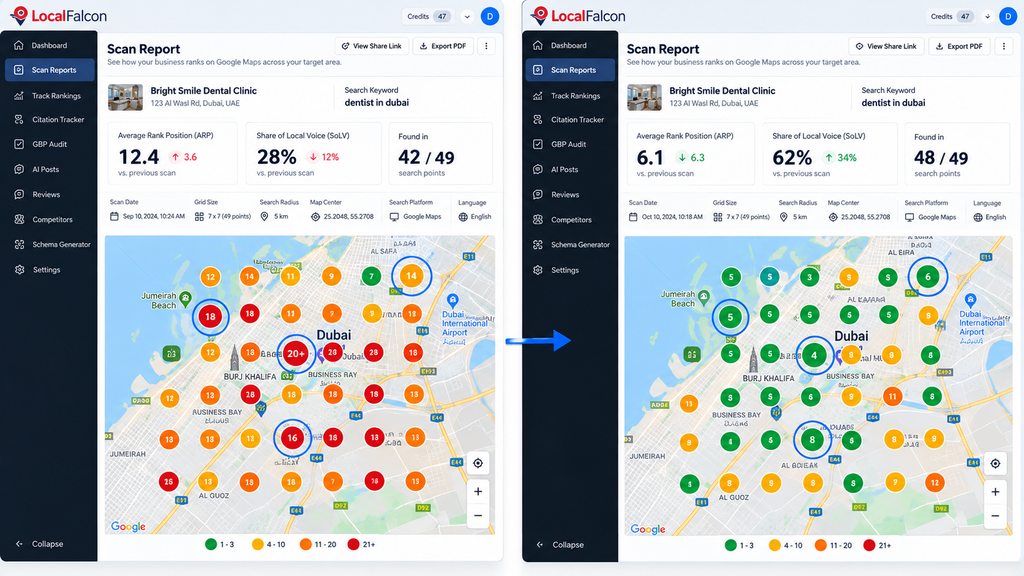
The official Scan Report guide explains its geographical measurements. Its competitor reports include Average Rank Position (ARP) and Share of Local Voice (SoLV), which measures visibility in the top three local results across the scanned points.
How would you use it?
Suppose a dental clinic wants to understand its visibility for emergency dentist across the neighborhoods it serves.
Start with a 7×7 grid centred on the clinic. Local Falcon checks 49 geographical points, giving you a map of where the clinic appears and which competitors occupy stronger positions elsewhere.
Repeat the scan weekly with the same keyword, grid centre, radius and settings. Comparing those scans is more meaningful than comparing two heatmaps generated with different geographical boundaries.
Pricing: How many credits will you actually need?
Local Falcon uses a credit system. For a standard geo-grid scan, each map point costs one base credit. Its official pricing page lists these monthly plans as of September 2026.
| Monthly plan | Price | Included credits |
| Starter | $24.99 | 7,500 |
| Basic | $49.99 | 15,150 |
| Pro | $99.99 | 31,250 |
| Premium | $199.99 | 63,150 |
New accounts receive 100 trial credits without a credit card. Unused monthly subscription credits expire at the end of the billing cycle. Additional pay-as-you-go credits are available separately.
Example: Four locations, ten keywords and weekly scans
| Locations | 4 |
| Keywords per location | 10 |
| Grid size | 7×7 (49 points) |
| Scans per month | 4 per keyword |
| Base credit requirement | 7,840 |
| Optional Falcon AI on every scan | 4,000 additional credits |
| Combined requirement | 11,840 credits |
Local Falcon charges 25 additional credits for Falcon AI analysis per report; its documentation says this analysis is enabled by default but can be disabled. The example excludes separate competitor scans and other optional features.
In this scenario, the Starter monthly allowance would run out even without AI analysis. The Basic plan’s published allowance would accommodate the illustrated workload, leaving room for some additional scans.
What do users say?
The Local Falcon G2 reviews examined during research showed a 4.7/5 rating from approximately 74 reviews. Users particularly appreciated visual reports and automated client reporting. Recurring criticisms concerned credit consumption, pricing and the effort required to interpret detailed data.
These reviews provide useful purchasing questions rather than evidence that every customer will have the same experience. Before subscribing, estimate how many scans you’ll run, not just how many locations you manage.
Advantages and limitations
| Advantages | Limitations |
| Shows geographical visibility that a single keyword position cannot describe. | Credit usage increases with grid size, keywords, locations and scan frequency. |
| Competitor Reports allow comparisons within the same scanned area. | A competitor’s ranking movement doesn’t establish what caused it. |
| Scheduled campaigns and historical reports support ongoing monitoring. | AI analysis and some integrations affect usage or plan requirements. |
| Supports Google Maps, Apple Maps and additional visibility research. | Different search platforms produce different metrics that shouldn’t be treated as interchangeable. |
Any Alternative: Geogrid offers Google Maps heatmaps, scheduled rescans and an API-oriented workflow. It advertises 200 free credits and a billing system that can avoid charging for certain cached or skipped grid points. Those savings are the vendor’s published claims; compare identical scans and invoices before treating them as established cost advantages.
Who should use Local Falcon? Local SEO specialists and agencies that need repeated geographical ranking measurements, competitor analysis and reports across multiple keywords or locations. If you’ll only check a handful of keywords occasionally, calculate your likely credit usage before buying a recurring plan.
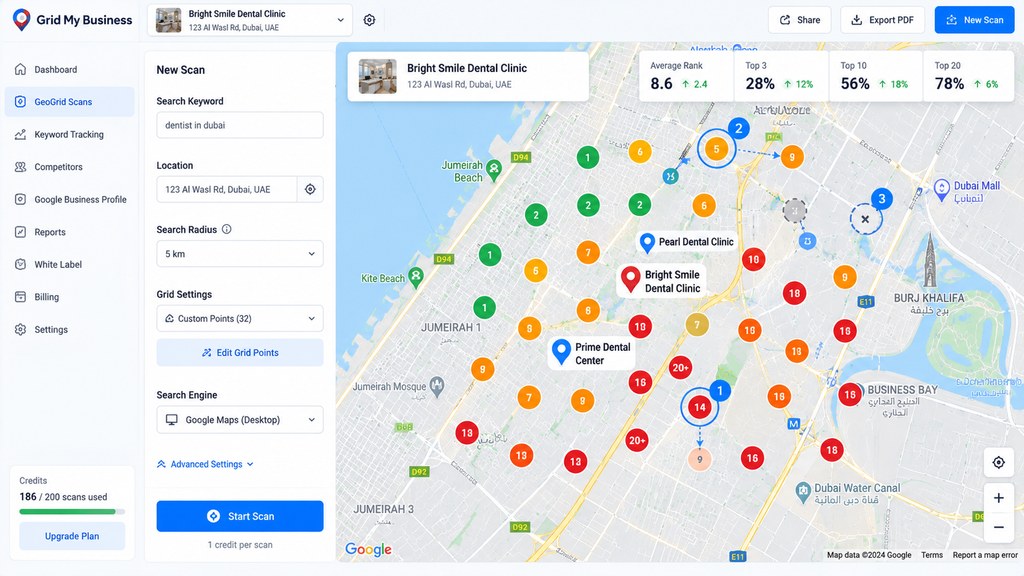
7. Grid My Business — Track Local Rankings and Competitor Visibility
Grid My Business combines Google Maps rank tracking with competitor research and Google Business Profile management. Its standout feature is flexible pin placement: you can move or remove geographical scan points instead of spending credits checking areas that aren’t relevant to your business.
That matters for an agency tracking a coastal town, for example. A perfectly square grid might place several search points in the sea, while a customized grid can concentrate on residential and commercial neighborhoods.
Core features
| Feature | What it helps you do |
| Customizable geo-grids | Adjust scan size, distance and individual pin locations to measure visibility across your target area. |
| Scheduled rank tracking | Monitor keywords weekly, every three days or daily, depending on your plan. |
| Competitor analysis | Compare competing businesses within the same scan and monitor changes to their Business Profiles. |
| Service-area business tracking | Check rankings across the areas served by businesses that visit customers rather than operate from a public storefront. |
| GBP management | Update business information, monitor reviews, schedule posts and use optional AI-assisted workflows. |
| Agency reporting | Export ranking, competitor, citation and profile reports, with workspaces and team access on relevant plans. |
The official ranking-intelligence documentation explains its flexible pins, scheduled scans and service-area business support. Its 2026 product updates also document competitor comparisons, heatmap views and AI-search monitoring.
How would you use it?
Suppose a home-cleaning company serves five neighborhoods, but only three consistently generate enquiries.
Create a grid around those target neighborhoods, move the pins away from irrelevant areas and scan the keyword home cleaning service. Then inspect competitors appearing in the areas where your business has weaker visibility.
Schedule the same scan to run repeatedly. By keeping the keyword, coordinates and scan settings consistent, you can compare the geographical pattern over time rather than reacting to an isolated ranking result.
Pricing and free access
The official pricing page lists the following plans as of September 2026.
| Plan | Monthly price | Scan credits | Business profiles |
| Starter | Free | 250 included credits | 2 |
| Growth | $29 | 7,500/month | 100 |
| Scale | $69 | 20,000/month | 300 |
| Dominate | $89 | 30,000/month | Unlimited |
Annual contracts are also advertised at $290, $690 and $890 respectively.
The free plan includes five tracked competitors and 20 citation checks. Growth adds up to 200 competitors and 500 monthly citation checks. Scale and Dominate increase those limits and provide additional workspaces and team seats.
There is an important distinction between unlimited keywords and unlimited scans. Even when a plan allows unlimited tracked keywords, every geo-grid scan still consumes credits.
Which plan would cover a growing agency’s workload?
Consider the four-location, ten-keyword, weekly 7×7 workload calculated in the previous review. It requires 7,840 base scan credits per month.
That slightly exceeds Growth’s 7,500-credit allowance. Scale’s 20,000-credit allowance would cover those baseline scans, although additional competitor research and other credit-consuming tasks still need to be considered.
Also check the reporting-history limit. The published comparison lists 30 days on Starter, 12 months on Growth, 24 months on Scale and lifetime history on Dominate. An agency preparing year-over-year reports should account for data retention before choosing a cheaper plan.
What do users say?
The Grid My Business G2 reviews highlight customizable grids, straightforward setup and visual reports. An August 2026 G2 seller snapshot showed approximately 4.7/5 from 45 reviews.
The criticism is more specific than general dissatisfaction. One March 2026 agency reviewer described difficulty managing keywords across multiple clients, which sometimes resulted in unnecessary duplicate scans. Another wanted more flexible reporting and deeper integrations.
A separate Reddit discussion about comparing local rank trackers documented different positions from several platforms despite apparently matching coordinates and scan radii.
It doesn’t establish which provider was correct, but it gives buyers a useful trial requirement: compare repeated scans under controlled conditions rather than trusting an advertised accuracy percentage.
Advantages and limitations
| Advantages | Limitations |
| Flexible pins help concentrate scans on relevant neighborhoods. | Managing large keyword sets across multiple clients can require careful organization. |
| Includes support for service-area businesses. | Plan allowances limit recurring scans even when keyword counts are unlimited. |
| Combines rankings, competitors and GBP workflows. | Some reporting, team and historical-data capabilities depend on the subscription tier. |
| Offers a permanently free starting plan. | The free credit allowance is small for repeated monitoring across many keywords. |
Grid My Business advertises a 98.7% accuracy figure, but its publicly accessible material does not provide enough independent methodological detail to establish that figure as a general performance guarantee. Treat it as a vendor claim and validate the tool against your own reporting requirements.
Any Alternative: GeoRanker provides location-specific keyword tracking, competitor research and broader SEO tools. Its published Pro plan starts at $99/month with 10,000 monthly credits. It is worth investigating when you also need conventional ranking and website research, rather than only Google Maps heatmaps.
Who should use Grid My Business? Small agencies and multi-location businesses that want customizable geographical monitoring alongside competitor and Business Profile management. Its flexible pins are particularly relevant when the area you actually serve does not fit neatly inside a standard square grid.
8. Whitespark — Combine Local Rank Tracking With Citation Research
Whitespark sells several distinct local SEO products rather than requiring every customer to purchase one large platform. This allows a business to buy a local rank tracker, research citation opportunities or commission listing cleanup according to the work it actually needs.
The purchasing decision requires care, however. Its Local Rank Tracker, Local Ranking Grids, Local Citation Finder and Listings Service are different products with separate pricing.
Core features
| Product | What it helps you do |
| Local Rank Tracker | Monitor Google organic and local rankings, compare competitors and track keyword performance over time. |
| Local Ranking Grids | Measure Google Maps visibility across geographical points and compare current, historical and competitor grids. |
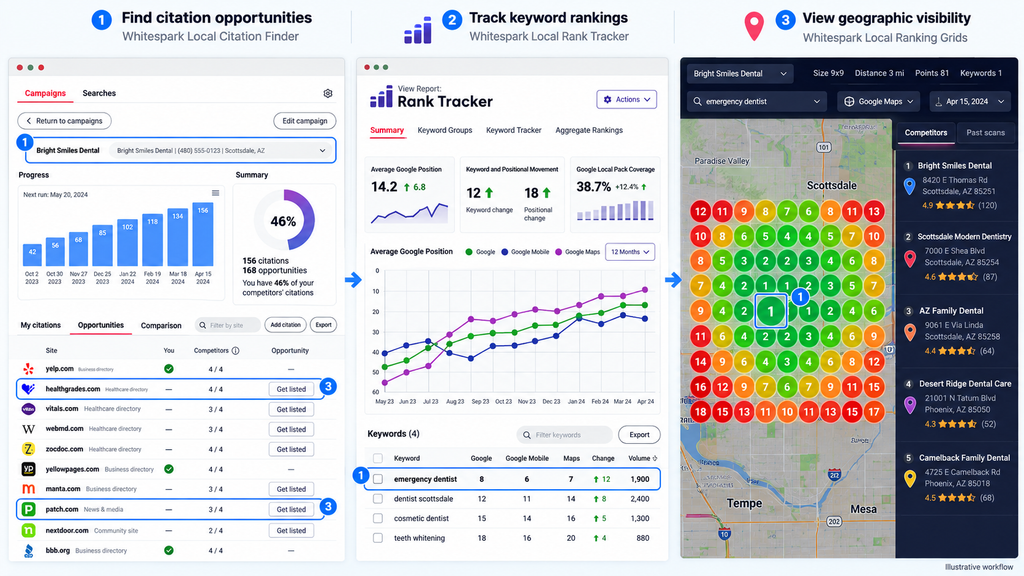
| Local Citation Finder | Discover relevant directory opportunities, identify citations competitors have and monitor citation growth. |
| Listings Service | Pay Whitespark to create business listings or correct existing citations instead of carrying out every submission yourself. |
| Local Platform | Manage connected Business Profiles, including selected bulk updates and protection against unwanted information changes. |
One useful distinction is that the conventional rank tracker and geographical ranking grids are not the same product. The first monitors selected keyword-and-location combinations; the second examines positions across multiple points within a geographical area.
Whitespark’s Local Ranking Grids documentation describes grids containing up to 225 points, competitor comparisons, scheduled scans and exports. Its Local Citation Finder identifies citation opportunities and separates sites where a business can submit information directly.
How would you use Whitespark?
Imagine an accounting firm opening a second office. Its first task is ensuring the new office’s name, address and phone number appear correctly on relevant directories. Citation Finder can identify suitable websites, including places where competing accounting firms already have listings.
The business could complete those submissions itself or purchase a separate listing-building service.
Once the location begins attracting search visibility, the Local Rank Tracker can monitor its important keywords. Geographical grids become useful if the firm wants to understand how visibility differs across its target neighborhoods.
This sequence prevents you from buying three products before determining whether all three are necessary.
Pricing: Understand what each purchase includes
Whitespark publishes separate prices for its software and services. The following figures come from its official pricing overview and individual product pages, checked in September 2026.
| Product | Entry price or free access | Important condition |
| Local Rank Tracker | From $17/month | Small Business plan, weekly tracking, monthly billing and 100 location-keywords |
| Local Ranking Grids | $10/month | 2,000 scan credits; 200 free trial credits |
| Local Citation Finder | Free limited plan; $39/month paid | Paid Small Business plan includes five campaigns and 20 searches per day |
| Listings Service | From $399 per location | One-time US cleanup-and-building package; other packages and markets vary |
| Local Platform | From $1/month per location | Separate GBP management product |
The Local Rank Tracker offers a 14-day trial. It also provides different pricing for daily tracking and annual billing; the local seo for Small Business daily-tracking plan is $25/month when billed monthly.
For Local Ranking Grids, one geographical point costs one credit. A 5×5 scan therefore consumes 25 credits, and unused subscription credits expire at the end of the billing period.
Citation Finder’s free plan includes one campaign, three daily searches and limited results. It discovers citation opportunities; it does not automatically purchase or complete the separate Listings Service for you.
What do users say?
Whitespark’s products have separate review profiles, so combining all customer ratings into one software score would be misleading.
The Local Rank Tracker G2 page showed 4.5/5 from only three reviews in the research snapshot. An April 2026 reviewer praised automated location-specific tracking and client-friendly reports but noted that the interface felt dated and that setting up numerous keywords could take time. This is useful feedback, although three reviews provide a limited basis for general conclusions.
Community discussions reveal a different purchasing concern: whether businesses should pay for citation discovery or simply complete a limited number of important directory submissions manually. In a July 2026 local SEO discussion, practitioners debated the value of relevant, completed listings against packages promising large submission counts. The discussion includes self-reported experience and promotional replies, so it should guide evaluation questions rather than establish a universal result.
Advantages and limitations
| Advantages | Limitations |
| Individual products let buyers avoid paying for unrelated functions. | Subscribing to multiple products can increase the combined cost. |
| Citation Finder supports competitor research and directory discovery. | Finding a citation opportunity is different from successfully creating or correcting the listing. |
| Separate geo-grid and traditional rank-tracking products support different measurement needs. | Buyers must understand which product produces the report they actually require. |
| Free citation research and trial credits provide entry points. | Meaningful recurring tracking and professional listing services require payment. |
Whitespark lists Citation Finder availability across 43 countries, including India and the UAE. Country inclusion does not mean every local directory, language or industry is equally represented, so check relevant directory opportunities before purchasing an ongoing subscription.
Any Alternative: Advice Local offers agency-focused citation distribution, listings management and white-label reporting. Unlike Whitespark’s self-service Citation Finder, its commercial offering emphasizes managed distribution and synchronization. Pricing is customized, so obtain a quote that specifies supported directories, location counts and what happens after cancellation.
Who should use Whitespark? Consultants who need detailed citation research, agencies that want to purchase individual tracking products and businesses that would rather outsource a defined citation-cleanup project than maintain a large ongoing software subscription.
9. Local Viking — Manage GBP Workflows and Monitor Local Rankings
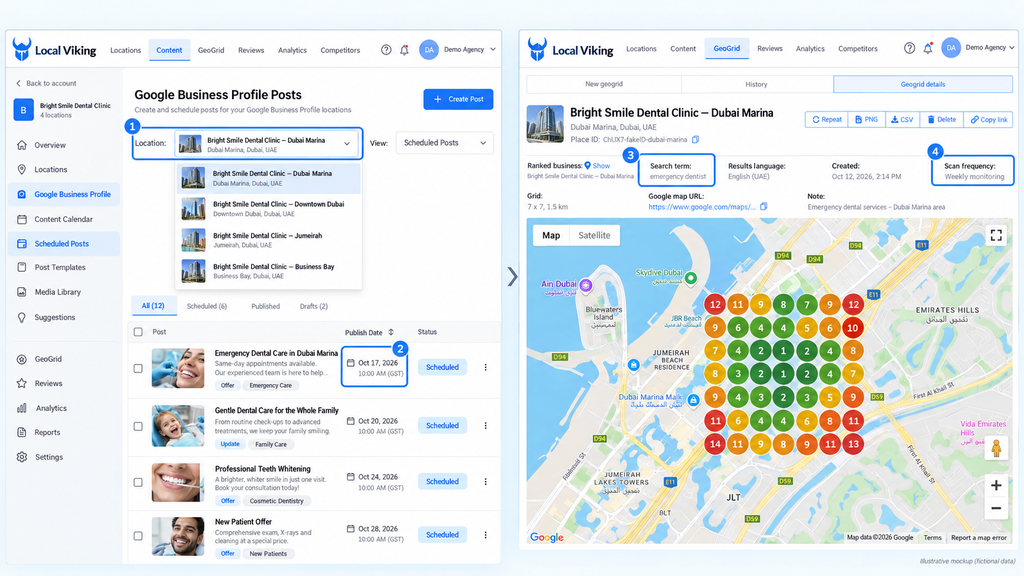
Local Viking combines Google Business Profile management with local rank tracking. Its distinctive workflow is the ability to schedule posts and media across multiple Business Profiles while monitoring local visibility from a central dashboard.
For agencies responsible for keeping numerous client profiles updated, that combination addresses two recurring jobs: publishing approved content and measuring geographical search visibility.
Core features
| Feature | What it helps you do |
| GBP management | Connect multiple Google accounts, update location information and manage profile media. |
| Bulk post scheduling | Schedule standard, event and offer posts across multiple locations, including recurring posts and CSV uploads. |
| Local rank tracking | Monitor Google Maps and website organic rankings, with mobile and desktop options. |
| GeoGrid tracking | Check rankings from multiple geographical points, schedule recurring scans and review historical results. |
| Competitor audits | Investigate nearby businesses and compare available on-page, off-page and profile information. |
| Agency reporting | Produce automated reports and use white-label reporting on eligible plans. |
Its official product overview describes posting, location management and geographical rank tracking. The getting-started documentation also covers scheduled grids, competitor audits and recurring client reports.
How would you use it?
Consider an agency managing 20 branches of a home-improvement retailer.
The team could prepare a seasonal offer, customize the content where necessary and schedule publication across participating branches. It could also configure recurring geo-grid scans for a few commercially important keywords at each location.
Instead of manually checking every branch, the agency would have scheduled content, ranking history and client reports in one workflow.
Local Viking supports spintax, which generates text variations from a shared template. That may simplify bulk publishing, but changing words alone does not make a post locally relevant. Each branch’s opening hours, services, offer eligibility and destination links still need to be correct.
Pricing and usage limits
There is an important verification issue with Local Viking’s current pricing. Its public pricing link redirects to a JavaScript-rendered Local Optics page that did not expose complete plan information during this research.
An August 2026 published pricing check reports the figures below. Local Viking’s older official plan documentation supports the listed location and credit structure, but the current checkout allowances should be reconfirmed before publication or purchase.
| Plan | Reported monthly price | Listed location allowance |
| Single | $39 | 1 |
| Starter | $59 | 10 |
| Pro | $99 | 20 |
| Agency | $149 | 40 |
| Enterprise | From $200 | Custom requirements |
No permanently free plan could be confirmed from the accessible current product information. Request a demonstration or trial arrangement directly from the vendor rather than assuming that a historical offer remains available.
How do its two credit allowances work?
Local Viking distinguishes ordinary keyword-tracking credits from GeoGrid credits.
Its credit documentation explains that keyword usage depends on the tracked result types and checking frequency. Monitoring Maps, desktop organic and mobile organic results for the same keyword can consume three separate credits per check.
GeoGrid scans use one credit per enabled geographical point. A 9×9 grid therefore costs 81 credits per scan, while disabling five unnecessary points reduces that scan to 76 credits.
The documentation also states that keyword credits do not roll over, while unused GeoGrid credits can accumulate. Because this guidance predates the current pricing-page transition, confirm the rollover conditions with the vendor.
This distinction matters for agencies: a plan with enough connected locations may still have insufficient credits for the desired keyword combinations and scan schedule.
What do users say?
Independent review data for Local Viking is less extensive than for several larger platforms. A reliable current G2, Capterra or Trustpilot rating for this exact product could not be established from the available results, so an aggregate satisfaction score would be misleading.
There is, however, relevant practitioner discussion.
In a September 2025 Reddit discussion, an agency managing nearly 40 locations appreciated the economics of Local Brand Manager, which users identified as part of the same product family, but questioned why its geographical ranking results differed from another tracking platform.
Other participants highlighted bulk GBP scheduling, audits and white-label reporting. Their accounts suggest that posting workflows can be a strong reason to consider the product, while ranking discrepancies deserve a controlled trial.
Advantages and limitations
| Advantages | Limitations |
| Combines bulk GBP publishing with traditional and geographical rank tracking. | Keyword tracking and GeoGrid use separate credit allowances. |
| Recurring schedules and bulk uploads reduce repetitive work across branches. | Template variations still require human checks for accuracy and local relevance. |
| Supports multi-client reporting and white-label options on relevant plans. | The current pricing-page redirect makes plan verification especially important. |
| Can track local and organic search performance in one workspace. | Differences between its ranking results and other tools may require controlled comparison. |
Another point deserves attention: the product’s marketing and documentation use both Local Viking and Local Brand Manager terminology, while the pricing page now redirects to Local Optics. Before starting a new contract, confirm which product and account system you are purchasing, what happens to historical reports and which support arrangements apply.
Any Alternative: GMBapi offers multi-location GBP management, bulk posting, review workflows, reporting and geographical rank tracking. Its rank-tracking documentation advertises unlimited geo-grid scans without additional scan credits. Confirm the subscription’s location limits and contractual terms directly, as the public materials do not establish that every organization pays the same price.
Who should use Local Viking? Agencies and multi-location businesses whose work involves both recurring Google Business Profile publishing and geographical rank monitoring. Before subscribing, validate its current pricing and run a representative workload that includes posts, keyword checks and scheduled grids—not just a single attractive heatmap.
All-in-One Local SEO Platforms
A specialist rank tracker tells you where your business appears. An all-in-one platform brings rankings, profile audits, listings and reporting into one workflow. The question is whether you’ll use those extra features often enough to justify the subscription.
10. BrightLocal — Combine Rank Tracking, Local Audits and Reporting
BrightLocal brings local rank tracking, Google Business Profile audits, citation research and client reporting into one platform. Its three plans—Track, Manage and Grow—let businesses add listing management and reputation tools as their requirements expand.
For agencies, the practical benefit is being able to investigate a client’s local visibility, identify listing problems and deliver branded reports without maintaining a separate dashboard for every task.
Core features
| Feature | What it helps you accomplish |
| Local Rank Tracker | Monitor local organic and Maps rankings, track keywords and compare competing businesses. |
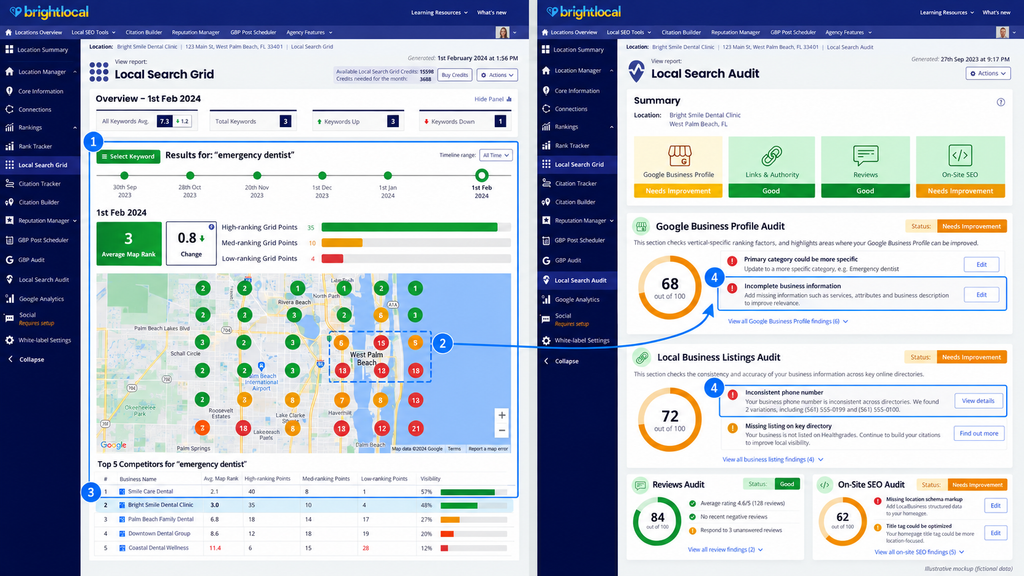
| Local Search Grid | See how Google Maps positions change across neighborhoods using geographical heatmaps. |
| Local Search Audit | Examine website, listing, citation and competitor information in one audit. |
| Citation Tracker | Find inconsistent business information and identify missing citation opportunities. |
| GBP management | Audit profiles, manage listing synchronization and schedule posts on eligible plans. |
| Reputation and reporting | Monitor reviews, request customer feedback and produce white-label reports, depending on the plan. |
BrightLocal’s official feature comparison confirms that rank tracking, geo-grids and audits are available across all three main plans. Active Sync and GBP posting begin with Manage, while review monitoring and generation require Grow.
How would you use BrightLocal?
Imagine an agency onboarding a dental clinic that already has a verified Google Business Profile but doesn’t know how visible it is outside its immediate neighborhood.
The agency can run a Local Search Audit, identify citation inconsistencies and establish a baseline using Local Search Grid. It can then schedule ongoing ranking reports while maintaining a separate record of actual enquiries.
That creates a repeatable audit and reporting process. The heatmap shows geographical visibility; it does not, by itself, establish how many new patients the clinic acquired.
Pricing and free access
BrightLocal’s detailed pricing documentation publishes the following rates for one active location. Prices checked in September 2026.
| Plan | Monthly billing | Annual billing | Main additional capability |
| Track | $41/month | $369/year | Local tracking, audits and reporting |
| Manage | $54/month | $485/year | Listing synchronization and GBP posting |
| Grow | $65/month | $584/year | Review monitoring and generation |
The advertised $31/month starting price is approximately the monthly equivalent of Track’s annual contract, not its month-to-month rate.
There are two additional costs to understand. Citation Builder is purchased separately, starting at $3.20 per citation or $2 with qualifying bulk credits. BrightLocal also limits manually initiated, ad-hoc report runs; a one-location subscription includes three monthly runs, with additional runs available to purchase.
If you only need citation building, the free Simply Listings account lets you purchase individual campaigns without maintaining a paid platform subscription.
What do users say?
BrightLocal’s G2 reviews show substantial positive feedback about its reporting, usability and support. Some reviewers question the combined cost of the platform and separately purchased citation services.
A more immediate concern appeared in a September 2026 practitioner discussion about inconsistent Local Rank Tracker results and historical reporting. BrightLocal attributed recent collection problems partly to Google’s increased restrictions on automated search access. The reports do not establish that every account is affected, but they make a representative trial important.
Advantages and limitations
| Advantages | Limitations |
| Combines local rankings, audits and citation research in one workspace. | Citation building costs extra. |
| White-label reports support recurring agency deliverables. | Manual report runs have monthly allowances. |
| Separate plans allow businesses to add listings and reputation management as needed. | The full platform is primarily intended for the US, UK, Canada and Australia. |
| Provides both conventional rank tracking and geo-grid reports. | Ranking-data delays or discrepancies should be checked during the trial. |
Any Alternative: Local Dominator combines geo-grid tracking, GBP management, citation tools, technical audits and white-label reporting. It’s relevant when geographical tracking and agency reporting are your main requirements rather than BrightLocal’s entire workflow.
Who should use BrightLocal? Agencies and local SEO consultants managing recurring audits, rankings and client reports. Choose the plan around the work you perform every month, not the number of features available. If you only need occasional citations or a single geographical ranking check, a full platform subscription may be unnecessary.
11. Semrush Local — Integrate Local SEO With a Broader SEO Workflow
Semrush Local combines Google Business Profile management, Maps rank tracking and—on its Pro plan—business listing distribution and reputation management.
The important purchasing distinction is that Semrush Local is a separate toolkit. You can buy it without subscribing to Semrush’s broader SEO software, or add it to an existing subscription. Paying for Local does not automatically unlock all the keyword research, backlink analysis and technical site-auditing functions in other Semrush toolkits.
Core features
| Feature | What it helps you accomplish |
| GBP AI Agent | Audit connected profiles and automate eligible posts, photos and review responses. |
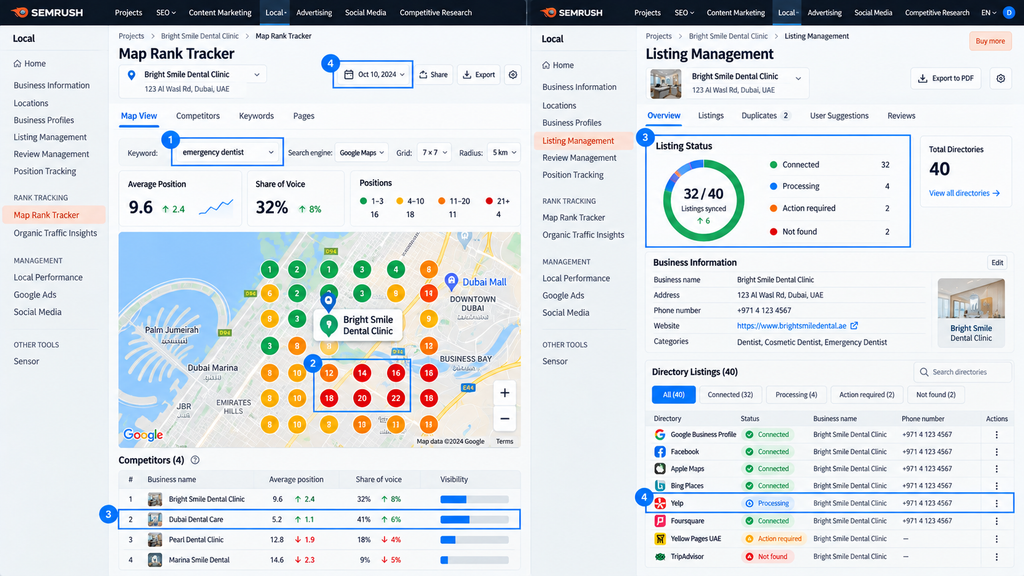
| Map Rank Tracker | Monitor Google Maps positions across geographical grids and inspect nearby competitors. |
| Listing Management | Distribute and maintain business information across supported directories on Pro. |
| Reputation management | Centralize eligible review-management and review-request workflows on Pro. |
| Multi-location management | Coordinate several business locations with expanded management capabilities on higher plans. |
| Wider Semrush ecosystem | Combine local work with keyword, backlink and website research through separately purchased SEO tools. |
Semrush’s Local Toolkit documentation distinguishes Base’s automated GBP management from Pro’s additional listings and reputation functions.
How would you use Semrush Local?
Consider a retailer with five branches that needs consistent holiday hours, regular Google Business Profile updates and visibility reports for each location.
The team can connect its profiles, use the AI Agent to prepare recurring updates and monitor important searches through Map Rank Tracker. If directory synchronization and centralized review management are also required, those functions point toward Local Pro.
The workflow still needs oversight. AI-generated posts must reflect each branch’s actual offers and opening hours, while review responses should address the customer’s specific experience.
Pricing and free access
Semrush’s official Local pricing page lists the following annual-billing rates as of September 2026.
| Plan | Published price | Main inclusions |
| Local Base | $30/location/month | GBP AI Agent and 375 Map Rank Tracker credits |
| Local Pro | $60/location/month | Base features, Listing Management, review tools and 1,225 map-tracking credits |
| Local Business | Custom quote | Custom limits, billing and enterprise support |
The published prices above require annual billing. Verify the current month-to-month amounts at checkout.
For five locations, the advertised annual-billing rate is equivalent to $150 per month on Base or $300 per month on Pro. An additional Semrush SEO subscription would increase the combined expenditure.
A free Semrush account or limited tools are not equivalent to permanent free access to Local Pro’s listing-management service.
What do users say?
Semrush’s broader G2 reviews frequently praise its wide range of SEO tools and consolidated research capabilities. Cost, add-ons and the learning curve are recurring objections. These are reviews of the broader Semrush product, not a controlled assessment of Local alone.
The purchasing concern is especially clear in a September 2026 local SEO discussion. A practitioner reported paying for Local Pro mainly to obtain listing distribution while completing some GBP and review tasks manually. That’s an individual experience, but it illustrates why buyers should identify which functions need ongoing automation.
Advantages and limitations
| Advantages | Limitations |
| GBP automation and map tracking are available without purchasing the entire Semrush SEO suite. | Pricing scales by business location. |
| Pro combines directory distribution, reputation management and geographical tracking. | Base excludes the broader listing-management functionality. |
| Useful alongside Semrush’s wider keyword and website research products. | Those other toolkits have separate subscription costs. |
| Business plans accommodate larger organizations with custom requirements. | Directory availability and map-credit allowances need checking for each market and workload. |
A particularly important issue is directory coverage. Semrush advertises distribution across more than 70 supported directories, but the eligible publishers vary by country. Confirm the actual network for your target market rather than assuming every advertised directory applies to every location.
Any Alternative: SE Ranking Local Marketing combines local rankings, GBP management, reviews and business listings with a broader SEO platform. Its current product documentation also distinguishes lightweight local monitoring from fuller listing-management allowances.
Who should use Semrush Local? Businesses wanting ongoing GBP automation and location-level tracking, particularly teams already using Semrush for wider organic SEO. Before purchasing Pro, check whether you need recurring directory synchronization and reputation management—or whether you’re primarily paying for one specialist function.
Listings and Reputation Management Software
A single incorrect phone number is manageable. The problem changes when dozens of branches have different opening hours, duplicate listings and reviews arriving across several platforms. Listings management software helps coordinate those updates, but directory coverage, ongoing fees and control over your data vary considerably.
12. Moz Local — Manage Business Listings and Local Reputation
Moz Local is designed to keep a business’s name, address, phone number and other location details consistent across supported directories. It combines listing distribution with data-health monitoring, review tools and selected local visibility features.
Its main purpose is ongoing listing maintenance. That’s different from purchasing a one-time citation-building service or conducting an occasional directory audit.
Core features
| Feature | What it helps you accomplish |
| Listing distribution | Publish and synchronize business information across supported directories and mapping platforms. |
| Data Health | Identify missing, inconsistent or incomplete location information. |
| Duplicate management | Detect possible duplicate listings and investigate conflicting business records. |
| Local Grid | Monitor geographical local-pack visibility on supported plans. |
| Review monitoring | Follow customer reviews and receive relevant alerts. |
| Reputation and social tools | Respond to reviews, analyze sentiment and publish content on eligible plans. |
Moz’s Local product documentation describes the platform as a central source of location information that distributes updates to its partner network. The documented service markets are the United States, Canada and the United Kingdom.
How would you use Moz Local?
Consider a salon that recently moved premises. Its Google Business Profile shows the new address, but older directory listings still direct customers to the previous location.
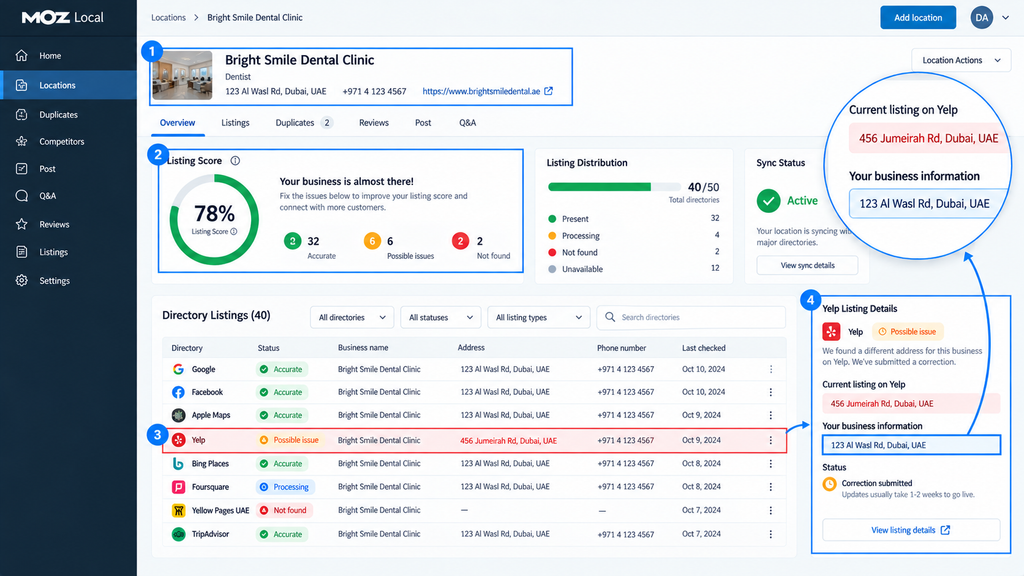
After connecting the business, the owner can inspect listing accuracy, submit updated information and identify records that still need attention. If the salon changes its phone number or operating hours again, the same platform can help maintain those records.
The important check is publisher-level confirmation. An update submitted by software is not necessarily an update already accepted and displayed by every directory.
Pricing and free access
Moz Local uses per-location subscriptions. The 2026 published plan information available through G2’s vendor-supplied pricing listing and other indexed pricing records indicate the following annual packages. The live Moz checkout could not be independently retrieved during this research, so these figures should be reconfirmed before publication.
| Plan | Indicative annual price per location | Main additional capabilities |
| Lite | $199 | Listing distribution, data health, local grid and review monitoring |
| Preferred | $299 | Review responses, competitor analysis and broader social tools |
| Elite | $399 | Expanded reporting, social functionality and included Listings AI |
Month-to-month billing is also advertised, and optional AI functionality can carry additional charges. Moz Pro, the company’s broader organic SEO platform, requires a separate subscription.
No permanent free Moz Local plan or standard free trial was confirmed in the accessible 2026 pricing information.
What do users say?
Moz Local’s G2 reviews showed a rating of 4.2/5 from approximately 475 reviews in the indexed research snapshot. Positive accounts describe the convenience of checking numerous directory records from one dashboard.
Some critical reviews describe slow listing updates, inconsistent issue detection and difficulty resolving support requests. One long-term customer’s 2025 review also raises concerns about listing access after cancellation. These are individual accounts, not verified platform-wide failure rates, but they identify important questions to resolve before purchasing.
Advantages and limitations
| Advantages | Limitations |
| Centralizes directory synchronization and listing-health checks. | Availability is limited to its documented supported markets. |
| Supports ongoing corrections when location details change. | Updates depend on individual publishers accepting and displaying them. |
| Adds reviews and competitor information on higher plans. | Per-location subscriptions accumulate as a business expands. |
| Provides a single workspace for listing maintenance. | Cancellation and listing-access conditions deserve verification before subscribing. |
Any Alternative: Synup offers listing distribution, duplicate management, bulk location updates and agency reporting. It also publishes country-specific publisher eligibility information, making that coverage worth comparing for businesses operating outside Moz Local’s core markets.
Who should use Moz Local? Businesses in its supported countries that regularly change location details or need continuous listing monitoring. Before subscribing, request the actual directory list for your location and confirm which listings you can manage directly if you later cancel.
13. Yext — Manage Listings and Location Data at Scale
Yext is built around a centralized system for managing business information across large networks of locations and publishers.
Its Knowledge Graph holds structured information about locations, products, services and other business entities. Authorized teams can update that information centrally and distribute relevant changes through Yext’s publisher integrations.
For an organization managing hundreds of locations, the important benefit is governance: deciding which information is authoritative, who can change it and how those changes reach external platforms.
Core features
| Feature | What it helps you accomplish |
| Knowledge Graph | Maintain structured, centrally approved business information. |
| Listings distribution | Publish location details through Yext’s network of more than 200 direct publisher integrations. |
| Duplicate suppression | Identify suspected duplicate listings and initiate supported suppression workflows. |
| Listings verification | Detect publisher discrepancies, failed updates and missing information. |
| Permissions and approvals | Control who can edit location information and maintain an audit trail. |
| Reviews, analytics and integrations | Add reputation workflows, location analytics and connections to business systems through relevant products and contracts. |
Yext’s publisher directory includes Google, Apple, Bing and numerous regional or specialist destinations. However, the full advertised network is not available to every business in every country.
How would you use Yext?
Imagine a restaurant chain opening 30 new branches while changing holiday hours across 120 existing locations. Instead of passing separate spreadsheets between marketing teams and local managers, the company could maintain approved information in its Knowledge Graph and distribute the appropriate records to eligible publishers.
Regional staff could have defined editing permissions, while headquarters retains oversight of sensitive changes.
This workflow depends on accurate source data. Centrally distributing an incorrect opening time can spread the mistake just as efficiently as distributing the correct one.
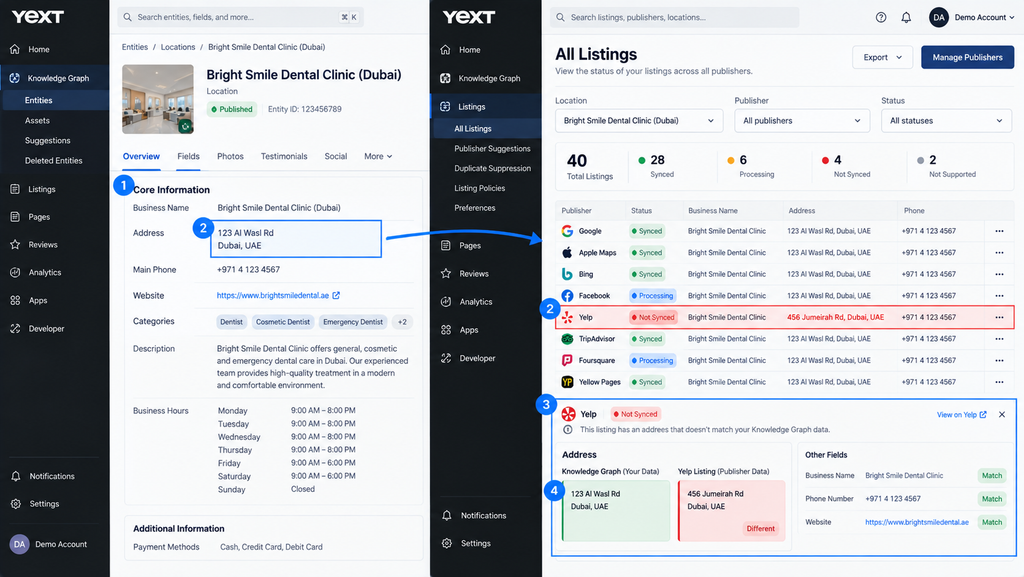
Pricing and free access
Yext does not publish a universal current price for its enterprise platform. Its sales process requests the buyer’s location count and requirements before preparing an offer.
Yext’s fiscal 2026 filing explains that subscriptions are generally annual or multiyear agreements, with pricing determined by the package and the number of licensed entities. Those entities may include business locations, professionals or other records.
| Purchasing element | What to verify |
| Listings subscription | Price per licensed entity and applicable publisher coverage |
| Additional products | Whether Reviews, Pages, Scout and other capabilities are included |
| Implementation | Migration, custom integration and onboarding charges |
| Contract | Minimum term, renewal rules, cancellation notice and export rights |
Yext offers a free business listings scan. That diagnostic scan is not free access to its paid listing-management platform.
What do users say?
Yext’s G2 profile displayed approximately 4.4/5 from more than 1,100 reviews in September 2026. Recent reviewers highlight centralized administration and the time saved managing large numbers of listings.
Cost is a recurring objection. Smaller businesses question whether the subscription is justified for a few locations, while some enterprise users describe the operational value of managing extensive location or practitioner records from one system. These experiences should be evaluated against each buyer’s actual scale.
Advantages and limitations
| Advantages | Limitations |
| Centralized structured data supports consistent administration across large location portfolios. | Pricing and contract terms require a customized quote. |
| Direct publisher connections and verification workflows improve operational visibility. | The advertised publisher count does not equal eligible coverage in every market. |
| Role-based permissions support franchises and regulated organizations. | Implementation and data governance can require substantial internal coordination. |
| APIs and integrations support complex business systems. | Additional products and professional services may increase the total contract value. |
One purchasing safeguard matters particularly here: obtain written confirmation of what happens to your published listings, historical data and integration access at the end of the agreement. Do not assume all publishers handle terminated connections in the same way.
Any Alternative: Partoo offers multi-location presence management, bulk updates, publisher-distribution tracking and API-based data feeds. Its custom pricing also separates visibility, reputation and messaging products.
Who should use Yext? Franchises, national retailers, healthcare groups and other organizations needing centralized location-data governance across extensive networks. Evaluate it as an operational platform, not simply as a subscription for creating more directory listings.
14. Uberall — Coordinate Multi-Location Listings and Reputation Workflows
Uberall combines location-data management, business listings, customer reviews and local social publishing.
Its main purpose is coordinating local marketing across branches without requiring every location to operate independently. Head-office teams can manage brand-wide information while location managers handle appropriate local activity through a shared system.
Unlike a dedicated citation checker, Uberall addresses several connected operational tasks: keeping business information accurate, responding to customers and coordinating local content.
Core features
| Feature | What it helps you accomplish |
| Location Data Management | Maintain business information, photos, hours and scheduled changes across locations. |
| Listings | Distribute information through supported publishers, investigate duplicates and monitor listing health. |
| Reviews | Centralize customer feedback, use response workflows and monitor reputation across locations. |
| Local Social | Coordinate localized publishing and campaign activity on eligible plans. |
| Local Performance Score | Identify profile-completeness and optimization opportunities using Uberall’s proprietary assessment. |
| Analytics and API | Monitor relevant location metrics and integrate approved data workflows with other systems. |
The official plan comparison distinguishes its core listings product from reviews, social functionality and optional analytics or collaboration packages.
How would you use Uberall?
Consider a retailer with 80 stores, each operating slightly different hours and running occasional local promotions.
The central team can maintain approved location information and schedule holiday updates. Regional managers can respond to reviews or publish locally relevant content where their permissions allow it.
Headquarters can then compare listing completeness, customer feedback and available location-performance data across the portfolio.
The benefit is a coordinated workflow, but implementation still requires clear responsibility for approving changes. Automated distribution cannot resolve disagreements between the head office and individual branches about which information is correct.
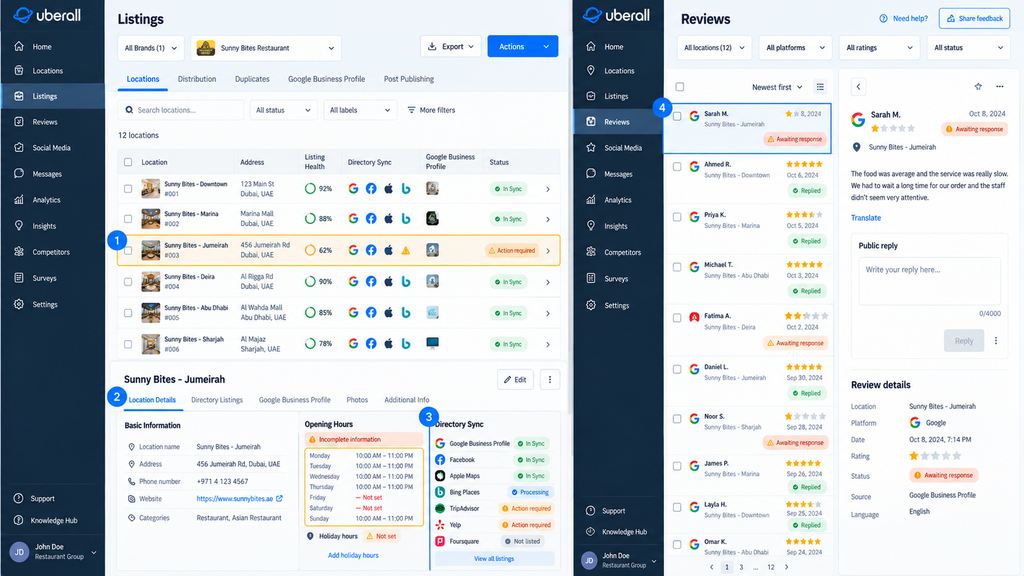
Pricing and free access
Uberall publishes three main packages but does not provide a universal public subscription price. Its official pricing page directs buyers toward a customized offer.
| Package | Published core functionality |
| Show Up | Location-data management and Listings |
| Stand Out | Listings and Reviews |
| Connect | Listings, Reviews, Local Social and Google/Apple posting |
Additional products include Reviews Plus, Analytics Plus, Collaborate Plus, location pages and other specialist functionality.
No standard permanently free full-platform plan was confirmed. Buyers should request a quote covering their exact location count, required markets and integration needs.
What do users say?
Uberall’s G2 profile showed approximately 4.4/5 from 251 reviews in September 2026. Users frequently praise centralized multi-location administration and the ability to coordinate updates across several platforms.
Critical feedback identifies setup and integration issues, particularly when connecting Google or Meta accounts. Some reviewers also report difficulty interpreting synchronization and resolution status in the dashboard. These are reported experiences, not evidence that every integration regularly fails.
Advantages and limitations
| Advantages | Limitations |
| Combines listings, reviews and local publishing in a shared workflow. | Subscription costs require a customized quote. |
| Centralized administration reduces repetitive updates across branches. | Connecting and organizing numerous existing accounts may require onboarding work. |
| Local permissions support coordination between headquarters and individual locations. | Reviews, advanced analytics and collaboration tools depend on purchased packages. |
| APIs and reporting support larger operational teams. | Publisher availability and integration capabilities require country-specific verification. |
For international businesses, the most important question is not how many publishers Uberall advertises globally. It’s whether the directories and mapping platforms your customers actually use are supported in each target country.
Any Alternative: Reputation combines business listings with review generation, response workflows and customer-experience analytics. Its published Rep Core plan starts at $80 per location per month, with additional analytics available on higher packages.
Who should use Uberall? Retail chains, restaurant groups and multi-location brands needing coordinated listings, reputation management and locally relevant publishing. Compare its operational capabilities against the work your regional teams currently perform, including account connections, approvals and reporting.
Local SEO Reporting for Agencies
Collecting local SEO data and explaining it to clients are different tasks. Reporting platforms consolidate metrics from several sources, but their usefulness depends on which integrations work, which measurements they expose and whether the resulting reports answer the client’s business questions.
15. AgencyAnalytics — Consolidate Local SEO and Client Performance Reports
AgencyAnalytics is a marketing reporting platform that brings data from SEO, Google Business Profile, advertising, analytics and other services into branded client dashboards.
Its primary role is reporting rather than implementing local SEO changes. An agency can connect the tools it already uses, organize their measurements and deliver scheduled reports without repeatedly exporting information from separate dashboards.
That distinction matters when comparing costs: the AgencyAnalytics subscription does not automatically replace the software responsible for collecting every underlying metric.
Core features
| Feature | What it helps you accomplish |
| 85+ integrations | Connect marketing, analytics, local SEO and other supported data sources. |
| GBP reporting | Display available profile impressions, website clicks, direction requests, reviews and call-button clicks. |
| Automated reporting | Schedule client reports and reuse templates across multiple accounts. |
| White-label dashboards | Add agency branding, custom domains and client-facing access. |
| Client management | Organize data sources, reports and permissions by client. |
| Additional rank tracking | Purchase an optional keyword tracker for supported search engines and locations. |
Its Google Business Profile integration supports reporting across several business locations. The platform also offers relevant integrations for Search Console, Google Analytics and specialist local SEO products.
How would you use AgencyAnalytics?
Imagine an agency reporting to a dental group operating four clinics.
The agency could connect the group’s Business Profiles and Search Console properties, then add relevant traffic or conversion data from Google Analytics. Its monthly report could show profile interactions, website search performance and the enquiries recorded by the client’s measurement systems.
Each metric should retain its actual meaning. A click on a Business Profile’s call button isn’t a confirmed appointment, and a third-party ranking chart doesn’t prove that the agency caused a particular movement.
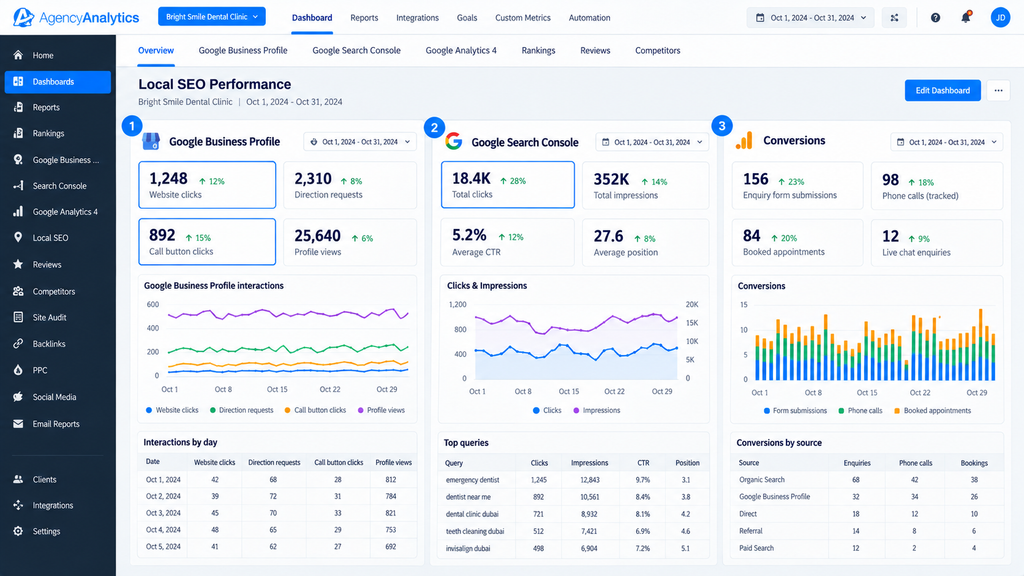
Pricing and free access
AgencyAnalytics currently advertises a simplified per-client pricing model. Its official pricing page lists $20 per client per month with annual billing. Monthly billing is listed at $25 per client in its 2026 vendor-supplied G2 pricing information.
| Purchase | Published price | What it covers |
| Core reporting | $20/client/month, billed annually | Reports, dashboards, integrations, branding and client access |
| Monthly Core billing | $25/client/month | Same core pricing model without the annual discount |
| Rank Tracker add-on | $41.67/month, billed annually | 500 tracked keywords |
| AI Tracker add-on | $20.83/month, billed annually | 250 AI-tracking credits |
| Enterprise | Custom quote | Larger-scale requirements and additional support |
The standard platform includes unlimited staff and client users, unlimited reports and access to its published integration network. A 14-day trial is available without a credit card.
For an agency managing 20 clients, the advertised annual-billing reporting rate is equivalent to $400 per month before optional add-ons or subscriptions to external data providers.
An integration limitation worth checking
AgencyAnalytics publishes a BrightLocal connector, but its July 2026 connection instructions specify particular BrightLocal account types and require an existing report before data can be imported. Agencies purchasing a newer BrightLocal package should confirm connector compatibility rather than assuming every subscription grants API access.
What do users say?
AgencyAnalytics’s G2 reviews showed approximately 4.7/5 from 460 reviews in the May 2026 indexed assessment. Users frequently highlight its report automation, interface and integration breadth. Reported drawbacks include occasional disconnected data sources, limited customization for certain requirements and support frustrations in individual cases.
A separate agency reporting discussion includes complaints about pricing and customization. These comments are useful for designing a trial, but their limited sample should not be presented as the experience of all agencies.
Advantages and limitations
| Advantages | Limitations |
| Consolidates local SEO, organic search and other marketing data into client reports. | Does not automatically replace all external data-collection tools. |
| Unlimited reports and users simplify recurring client reporting. | Costs scale with the number of billable clients. |
| White-label portals and scheduling reduce manual report preparation. | Certain integrations require specific external subscription plans. |
| Optional tracking adds functionality without purchasing it for every account. | Ranking and AI-tracking add-ons increase total expenditure. |
AgencyAnalytics offers conventional local keyword tracking through its optional tracker. Agencies needing a particular geo-grid methodology should verify whether the required heatmaps are available through a compatible integration rather than assuming that standard keyword tracking provides them.
Any Alternative: Whatagraph is another cross-channel reporting platform, with custom transformations, agency branding and automated reports. Its published Max plan costs €699/month on annual billing and includes 50 source credits, making the exact number and type of required integrations especially important when comparing costs.
Who should use AgencyAnalytics? Agencies managing several clients that already collect data across multiple marketing platforms and need consistent, branded reporting. Its value lies in making that information easier to interpret and deliver—not in guaranteeing that the underlying local SEO measurements are accurate or that every reported interaction becomes a customer.
How Much Do Local SEO Tools Actually Cost?
A $30 subscription can become a $300 monthly expense when you add ten business locations. Geo-grid tracking works differently: your bill depends on how many keywords you scan, how large the grid is and how often you repeat the scans.
Before comparing local SEO software prices, calculate the cost of the work you actually intend to do. The cheapest advertised plan isn’t necessarily the cheapest way to manage your business.
Free Plans vs Paid Subscriptions: What Is Really Included?
The word free can mean anything from unrestricted access to enough trial credits for a handful of searches. Check what remains available after the trial ends.
| Access model | Example | What to check |
| Permanently free | Google Business Profile and Google Search Console | Whether they provide the specific reports or automation you need |
| Limited free plan | Free tiers offered by some local rank trackers | Monthly credits, tracked locations and reporting limits |
| One-time trial credits | Local Falcon’s 100 credits; Whitespark’s 200 grid credits | How many scans you can complete before upgrading |
| Time-limited trial | BrightLocal’s 14-day trial | Which features remain accessible after the trial |
| Paid subscription | Monthly or annual software plans | Location allowances, scan frequency, exports and add-ons |
| Custom contract | Enterprise offerings from Yext and Uberall | Implementation fees, minimum term, renewal and cancellation conditions |
Google confirms that creating and managing an eligible Business Profile costs nothing. Its free tools are useful foundations, but they don’t eliminate every need for specialist reporting or automation. Trial allowances also differ: Local Falcon offers 100 introductory credits, while Whitespark Local Ranking Grids offers 200.
For context, a 5×5 geo-grid uses 25 points. Under Local Falcon’s standard one-credit-per-point model, 100 trial credits cover four such scans of one keyword. They won’t cover a full 5×5 scan of five keywords, which requires 125 credits.
That is why a free trial is useful for checking the interface and interpreting a report, but isn’t necessarily enough to establish a meaningful ranking trend.
What Happens to the Price When You Add Locations, Keywords and Reports?
Local SEO tools use several pricing models. The number of businesses you manage is only one part of the calculation.
| Cost driver | How it affects your bill | What to check before subscribing |
| Business locations | A per-location fee or a higher location allowance | The cost of adding another branch or client |
| Keywords and grid size | More keyword scans and geographical points consume additional credits | The required grid dimensions and monthly credit allowance |
| Scan frequency | Daily monitoring consumes more resources than weekly or monthly checks | Whether scheduled scans use the same credit allowance |
| Client reporting | Some platforms charge per client or for reporting add-ons | Report scheduling, branding, exports and data retention |
| Team members | Some products charge for additional seats | Included users, permissions and client access |
| Integrations and API | Exports may be included while advanced integrations require an upgrade | The exact subscription needed for your reporting workflow |
| Citation building | Directory submissions and duplicate removal may be billed separately | One-time charges, recurring synchronization and future updates |
These differences make starting-price comparisons misleading. BrightLocal’s location-based pricing puts its Track plan at $41/month for one location but $62/month for two to five. Semrush Local instead advertises Base at $30 and Pro at $60 per location per month when billed annually.
Other charges are easy to overlook. BrightLocal’s Citation Builder costs $3.20 per standard manual submission without bulk credits, and duplicate removal is an additional service. Semrush advertises extra user seats and reporting packages separately.
The same applies to integrations. Local Falcon includes its Looker Studio and Zapier integrations on eligible packages above its monthly Starter plan. If your client reporting depends on those connections, the lowest-priced plan may not meet your requirements.
Real Cost Examples for One Business, a Small Agency and a Multi-Location Company
The examples below use published US-dollar prices checked in September 2026. They are illustrative workloads, not universal recommendations or guaranteed checkout totals. Taxes, additional features and country-specific terms may change the amount payable.
| Business scenario | Illustrative requirements | Published-price calculation |
| One local business | Free profile and website monitoring; optional weekly tracking of five keywords on a 5×5 grid | $0 with Google tools alone; $24.99/month if adding Local Falcon Starter |
| Small agency | Five clients, one location each, eight keywords per location, weekly 7×7 scans, automated client reporting | $599.88/year for Local Falcon Basic annual plus $1,200/year for five AgencyAnalytics clients |
| Twelve-location company | GBP automation and Maps monitoring at every branch | Semrush Local Base: $4,320/year; Pro: $8,640/year at published annual-billing rates |
The calculations use the vendors’ published Local Falcon credit allowances, AgencyAnalytics client pricing and Semrush Local rates. These products perform different jobs, so the scenarios are budget illustrations rather than equivalent software packages.
One business: Start by checking whether you need recurring scans at all.
For a single location tracking five keywords on a 5×5 grid every week, the yearly requirement is 5 keywords × 25 points × 52 scans = 6,500 base credits. Local Falcon Starter’s published monthly allowance is sufficient for that workload, assuming no substantial additional credit-consuming tasks.
If you only want an occasional visibility check, a limited free tool may be enough. Paying for weekly monitoring makes more sense when you intend to compare the results and act on them.
Small agency: Budget for a full year of scans, not just four weeks.
Five locations with eight keywords each, using a 7×7 grid every week, require:
The example excludes competitor-only scans, optional AI analysis and any other software the agency needs. It also assumes that each of the five businesses is billed as a separate reporting client.
Multi-location company: Check whether your costs grow linearly.
Twelve branches on Semrush Local Base would cost the equivalent of $360 per month, billed annually. Pro would cost $720 per month on the same basis. Those amounts cover the advertised Local toolkit, not a separate subscription to Semrush’s wider organic SEO tools.
At larger scales, a location-tiered platform or custom enterprise agreement may produce a different cost structure. Semrush directs businesses with 20 or more locations toward its customized Business offering; a published per-location calculation should not be mistaken for a confirmed enterprise quote.
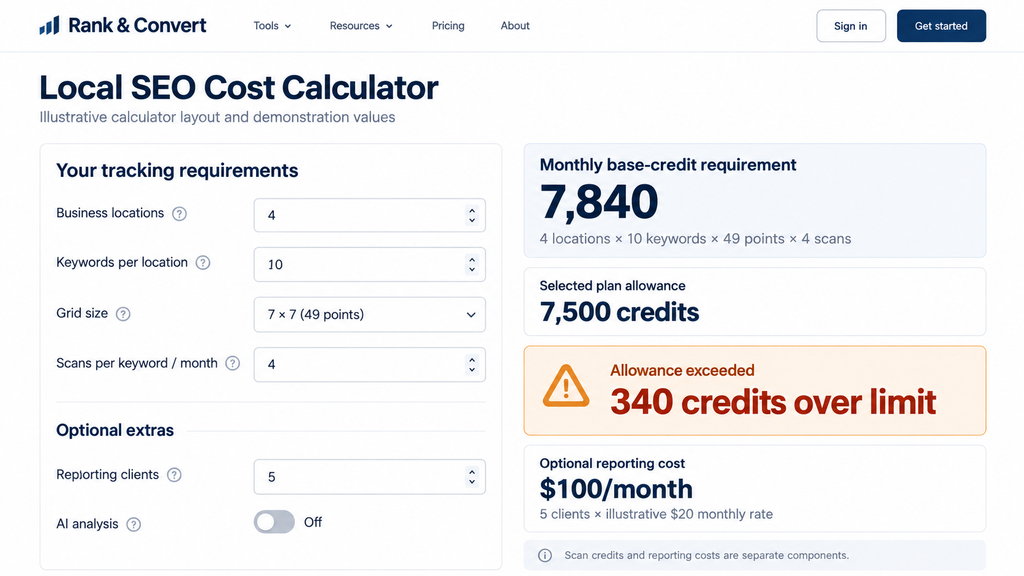
Which Tool Stack Fits Your Business Without Paying for Overlapping Features?
A tool that handles ten different tasks isn’t necessarily useful if you only need three of them. Before buying an all-in-one local SEO platform, separate the work you need to do once from the work you’ll repeat every week.
For most businesses, the decision comes down to four jobs: identifying problems, fixing them, monitoring changes and reporting results. You don’t need separate subscriptions for every job if your existing tools already cover some of them.
One Business Location — When Free Tools May Be Enough
If you run one restaurant, salon or local service business, start with the systems you control: your Google Business Profile and website.
Use Google Business Profile to maintain accurate business information and manage customer interactions. Use Search Console to identify organic search queries and investigate issues affecting your service or location pages.
Add paid software only when you have a specific recurring requirement.
| Your situation | What makes sense |
| You occasionally check nearby competitors | Use a limited free audit or local search checker |
| You need monthly geographical ranking comparisons | Consider a specialist geo-grid tracker |
| You’ve moved premises and have outdated directory listings | Investigate a one-time citation-cleanup service |
| Your details regularly change across numerous directories | Consider ongoing listings management |
| Your website has indexing problems | Investigate the issue in Search Console before purchasing another rank tracker |
The important difference is between a one-time problem and an ongoing responsibility. Correcting a few citations once doesn’t necessarily justify paying for permanent synchronization. Repeatedly checking rankings across several neighborhoods may justify recurring tracking.
Freelancers and Small Agencies — Balancing Cost and Client Reporting
An agency’s costs rise when each new client requires another subscription, login or reporting process.
A practical starting stack combines free Google data with one paid tool for the task that cannot be completed efficiently by hand. That might be geographical rank tracking, recurring citation monitoring or automated reporting.
Before expanding the stack, compare the work your team performs every month.
| Agency requirement | Specialist-tool approach | All-in-one approach |
| Occasional competitor audits | Use individual audit tools when required | Use the platform’s included audit functions |
| Recurring geographical tracking | Purchase a dedicated geo-grid tracker | Check the suite’s grid limits and credit allowance |
| Monthly client reports | Export data into an existing report template | Use integrated or automated reports |
| Listings and reviews | Manage directly or use a separate service | Centralize them if included in the subscription |
| Additional staff | Give access only to the required products | Check included seats and role permissions |
The less obvious cost is staff time. Maintaining three inexpensive tools can become expensive if someone spends hours exporting files, reconciling different metrics and preparing reports.
However, an integrated platform isn’t automatically simpler. Check whether it supports your existing accounts, whether reports can be customized and whether an extra subscription is required for the functions you actually need.
Keep client ownership separate from agency access. Google’s Business Profile access documentation allows owners to invite managers without sharing passwords. A client should retain appropriate control of its profile when an agency relationship ends.
Multi-Location Businesses — When Centralized Software Makes Sense
For a company managing 50 stores, correcting opening hours in 50 separate dashboards is an operational problem. The same applies to distributing new phone numbers, updating services or coordinating reviews across regional teams.
This is where centralized location management becomes more useful than adding individual tools.
Look for a platform that can maintain an approved record of each location’s information and distribute changes to the relevant publishers. Bulk editing, scheduled updates, role-based permissions and integrations with existing business systems become more important as the location network grows.
For example, Uberall’s location-management documentation describes bulk updates, scheduled changes, location segmentation and role-based permissions. Those functions address a different operational requirement from simply checking Google Maps rankings.
Before signing a multi-location contract, verify three things: which directories are supported in each operating country, who can approve changes to individual locations, and whether your business can export its information when the contract ends.
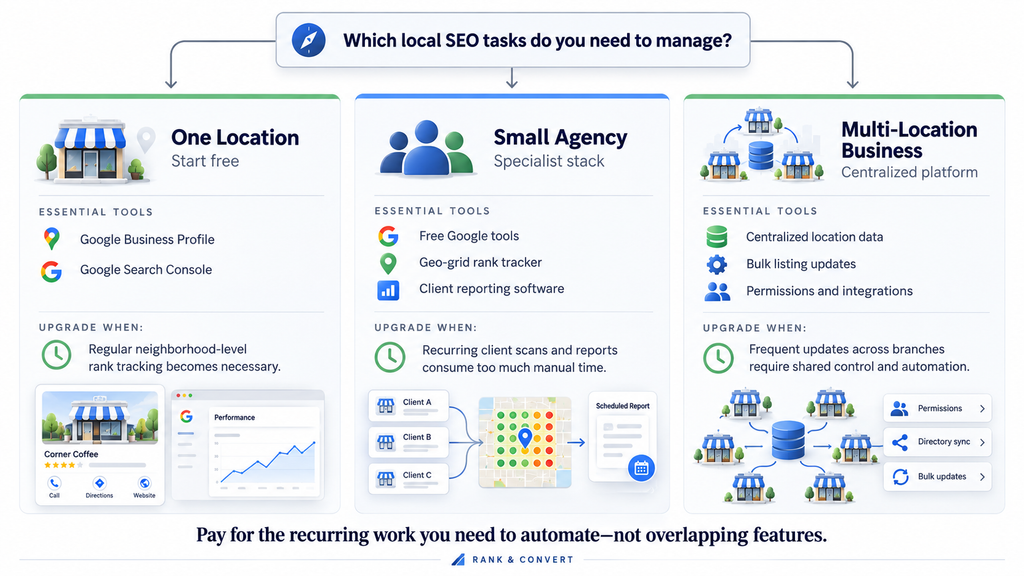
Can You Trust the Rankings Reported by Local SEO Tools?
Your geo-grid report shows position three, but a Google Maps search from the same neighborhood shows position seven. That doesn’t automatically mean either result is wrong.
A rank tracker records search results under a particular set of conditions. Understanding those conditions matters more than treating any single position as a permanent ranking.
Why Your Google Maps Ranking Changes Across Neighborhoods
Google says local results are primarily determined by relevance, distance and prominence. Distance is particularly important when interpreting geo-grid reports: the same business can occupy different positions when a search is performed from different locations.
Search conditions matter too. Your own search may differ from a tool’s result because of the device, search history, precise location, search interface or time the result was collected. Google also explains that an individual search may not match the average position reported in Search Console, although Search Console’s metric measures website search results rather than Maps geo-grids.
For that reason, an agency shouldn’t promise that every customer in a neighborhood will see the position displayed at the nearest grid point.
How to Read a Geo-Grid Without Misinterpreting the Results
A geo-grid divides a selected area into geographical search points. A 7×7 grid contains 49 points, with each point representing a separate local ranking check.
The colours make changes easy to spot, but the underlying numbers are more useful when deciding what to investigate.
| What you see | What it may tell you | What it doesn’t establish |
| Strong positions near the business | Visibility is stronger around those sampled coordinates | Every nearby customer sees the same result |
| Weaker positions farther away | Geographic coverage may decline with distance | Distance is the only reason |
| A competitor appearing across more points | The competitor has wider visibility within that sampled grid | Its total market share or customer volume |
| More top-three positions over time | Visibility improved across the sampled points, if settings remained consistent | The improvement caused additional enquiries |
Local Falcon’s metric documentation makes another distinction worth understanding. Its Average Rank Position (ARP) averages positions where a business appears, while Average Total Rank Position (ATRP) also accounts for points where the business is absent by assigning a default value. The two metrics can therefore tell different stories about the same scan.
Consider a hypothetical 7×7 scan in which a business appears in the top three at 21 of 49 points. Its top-three coverage is approximately 43% of the sampled grid. That does not mean it captures 43% of local searches, customers or revenue.
The size of the grid matters as well. A smaller scan radius may produce a more attractive heatmap simply because it excludes neighborhoods where the business ranks poorly. Compare the same geographical area when measuring progress.
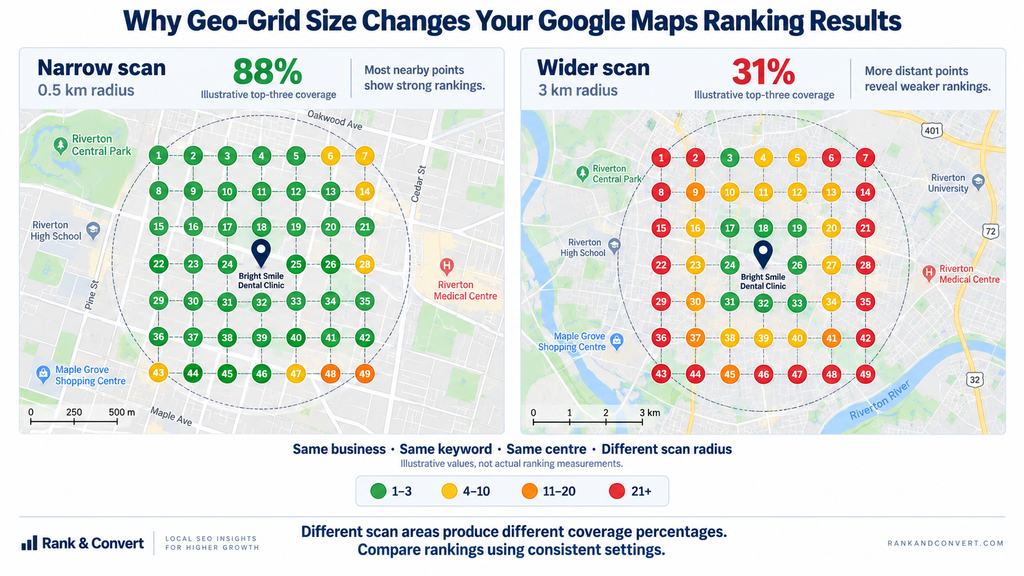
How to Check Whether Two Tools Are Producing Comparable Results
When two Google Maps rank trackers disagree, start by checking whether they performed the same search under comparable conditions.
A useful comparison records:
- The exact business and keyword: Confirm the correct listing, ideally using its Place ID, and use identical search terms.
- The geographical points: Compare actual latitude and longitude coordinates—not just matching grid sizes or radius labels.
- The result type and settings: Establish whether each tool checks Google Maps or another search-results surface, along with the available device, language and ranking-depth settings.
- The collection time: Run scans as close together as possible and record the timestamps.
- Repeatability: Repeat the comparison using fixed settings to see whether differences persist.
This is a practical measurement protocol, not a guarantee that both tools will return identical rankings.
A February 2025 Reddit discussion described a practitioner obtaining different rankings across Semrush, Grid My Business, Local Falcon and their own API-based method, despite attempting to match the geographical settings. That account highlights an important limitation: matching visible settings may still leave differences in collection methods and the results returned at a particular moment.
For ongoing reporting, consistency is usually more useful than switching trackers every time another tool displays a more favourable position. Maintain the same search terms, coordinates, settings and measurement schedule, and investigate unusual changes before treating them as meaningful.
A geo-grid can show where your visibility is changing. Whether that change brings more customers requires a separate look at Business Profile interactions, website activity and confirmed enquiries.
How Do You Know Whether Your Local SEO Tool Is Delivering Results?
Your Google Maps rankings are improving, your dashboard looks promising, but the phone isn’t ringing any more often. Is your local SEO actually working?
Rankings show where your business appears, not what happens after someone finds it. To understand whether your local SEO tools are delivering value, you need to connect search visibility with customer actions and, where possible, confirmed enquiries or bookings.
Which Metrics Measure Visibility, Engagement and Actual Leads?
A useful local SEO report separates three things: visibility, customer engagement and business outcomes. Mixing them together makes it easy to mistake an attractive ranking chart for revenue growth.
| What you’re measuring | Data source | What it tells you |
| Local search visibility | Google Maps rank tracker | Where your business appears for selected keywords across your monitored locations |
| Business Profile engagement | Google Business Profile Performance | Profile views, website clicks, call-button clicks and direction requests |
| Organic website performance | Google Search Console | Which queries and pages generate search impressions and clicks |
| Website enquiries | Google Analytics 4 (GA4) | Tracked form submissions, booking actions and other configured key events |
| Actual business outcomes | Call-tracking system, booking platform or CRM | Answered calls, qualified enquiries, completed appointments and recorded sales |
Google’s Business Profile performance documentation draws an important distinction: its Calls metric counts clicks on the profile’s call button, not answered conversations. Its Bookings metric records completed bookings only where a supported booking provider supplies that information.
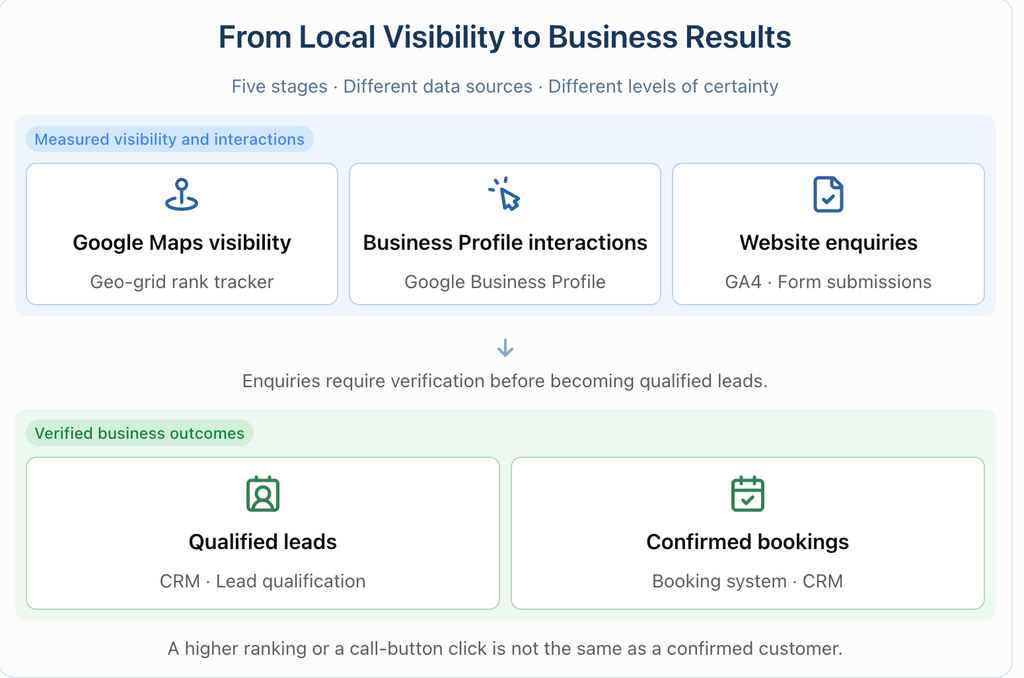
Search Console measures something different again. Its Performance report records Google Search clicks and impressions, while GA4 measures activity on your website. A Search Console click and a GA4 session aren’t interchangeable figures.
The gap becomes clear when a dental clinic reports more call-button clicks but no increase in appointments. It needs to investigate whether calls were answered, how many callers were prospective patients and how many ultimately booked.
How to Connect Local SEO Reporting to Business Outcomes
You don’t need another expensive dashboard to start measuring results. First, make sure your existing data sources can answer what happens between someone finding your business and becoming a customer.
Start by identifying visits from your Business Profile. Add consistent UTM parameters to the website link on your profile, so GA4 can distinguish those visits from other website traffic. For example, use utm_source=google, utm_medium=organic and utm_campaign=gbp_profile, with a consistent naming convention for each location.
Google’s campaign URL documentation explains how these parameters populate acquisition reports. Test the final URL after publishing it, particularly if your website redirects visitors to another page.
Next, track actions that matter. Rather than counting a click on your contact button as a completed enquiry, configure GA4’s recommended generate_lead event when someone successfully submits a form. For businesses with longer sales cycles, Google also supports events such as qualify_lead and close_convert_lead to represent later stages.
The remaining step is to connect website and phone enquiries to the system that records what happened afterward.
For a clinic, that might mean using a call-tracking platform to identify answered calls and a booking system to record appointments. A CRM can help distinguish a new prospective customer from an existing patient calling to rearrange a visit.
What a useful monthly report might reveal
Hypothetical example; these figures are illustrative, not results from a real business.
| Observation | What to investigate |
| Rankings improve, but profile interactions stay flat | Search demand, keyword relevance and whether the tracked area reflects the business’s actual market |
| Call-button clicks increase, but answered calls do not | Missed calls, opening hours and telephone availability |
| Website visits increase, but enquiries remain flat | Landing-page relevance, mobile usability and form completion |
| Qualified enquiries increase, but bookings do not | Appointment availability, pricing, follow-up and the booking process |
For an agency, the practical solution is often to bring these sources into one client report while preserving each metric’s definition. AgencyAnalytics’ Business Profile integration, for example, supports location-level reporting alongside data from other connected marketing platforms.
Be careful with attribution. Someone may discover a business on Maps, return through an organic search result and later book by telephone. Those actions won’t necessarily be connected across the different reporting systems. GBP performance can also include interactions associated with Google Ads, so its totals shouldn’t automatically be described as organic SEO results.
Report confirmed outcomes where you can reliably measure them, and identify the gaps where you cannot. An improvement after an SEO campaign is useful evidence, but it doesn’t prove that the campaign alone caused the change.
What Should You Check Before Paying for a Local SEO Tool?
A free trial can make almost any local SEO platform look useful. The harder question is whether it can complete your everyday work without extra charges, unreliable data or features locked behind another subscription.
Before purchasing, test the software with your own business, confirm exactly what’s included in the plan and understand what happens to your data when you leave.
Test the Tool Using Your Own Business and Real Keywords
Don’t judge a rank tracker by a demonstration heatmap or a listings platform by its feature count. Give each tool a task you currently perform and see whether it completes that task accurately.
During the trial, use this checklist:
- Test a real problem. Audit an existing Business Profile, track a commercially relevant keyword or investigate an inaccurate directory listing. Avoid relying entirely on the vendor’s demonstration account.
- Check your actual plan. Confirm that the functions you tested are included in the subscription you intend to purchase, rather than a higher trial tier.
- Inspect the underlying data. Check the collection date, search locations, source metrics and export options. Investigate missing or unexpected results instead of accepting the dashboard at face value.
- Complete an entire workflow. Generate a client report, schedule a repeat scan or submit a listing correction. Record how much manual work remains.
- Contact support with a genuine question. Ask about an unclear billing rule, missing integration or failed report. Evaluate whether the response resolves your issue.
For a geo-grid tracker, use fixed keywords and coordinates across repeated scans. For listings software, examine the status of an actual publisher submission rather than assuming that submitted means published.
The objective is to establish whether the tool helps you complete your work—not simply whether its interface is attractive.
Check Hidden Costs, Country Coverage and Integration Limits
A tool may support Google Maps tracking in your country without supporting citation building, review management or automated business-listing distribution there.
BrightLocal illustrates why individual features need separate checks. According to its country-availability documentation, Local Search Grid supports six countries, while Citation Builder operates in 20. Its Active Sync service has a smaller supported-country list. BrightLocal also states that it currently cannot accept payments from customers based in certain countries, including India.
Semrush’s Listing Management documentation, by contrast, includes India, Saudi Arabia and the UAE among its supported markets. However, the actual directory network varies by country; being supported does not mean every advertised publisher is available for your location.
Integration access can introduce another unexpected cost. For example, AgencyAnalytics’ July 2026 BrightLocal connection instructions specify eligible BrightLocal account types, an API key and an existing report for the location being connected. Verify that your current subscription provides the necessary access before purchasing a reporting platform around that integration.
A useful purchasing comparison should therefore show the total cost of the required workflow: the correct subscription tier, additional locations, relevant regional coverage, API or export access, and any separately purchased services.
What Happens to Your Listings and Data If You Cancel?
Ending a software subscription and losing your business listings are not the same thing. However, cancelling ongoing synchronization means the provider is no longer responsible for keeping those listings updated.
The distinction varies by vendor:
| Provider | What its published cancellation policy says |
| Semrush Local | Existing directory information remains, but Semrush stops distributing updates and monitoring reviews. Publishers may subsequently change the information through their normal data processes. |
| Moz Local | Its partners do not automatically revert listings, but active management stops. The company warns that other data sources may change listings over time. |
| Yext | Yext says it does not deliberately revert listing information on cancellation. Individual publishers may later update records using other information sources. |
| BrightLocal | Paid report access ends after the remaining subscription period. Separately purchased Citation Builder campaigns can continue through its free Simply Listings account. |
These conditions come from the vendors’ own Semrush cancellation guidance, Moz Local cancellation documentation, Yext support information and BrightLocal account policy.
The practical safeguard is to prepare for departure before you subscribe. Keep your business as the appropriate owner of its Google Business Profile, maintain independent access to important directory listings and export the reports and location data your team needs.
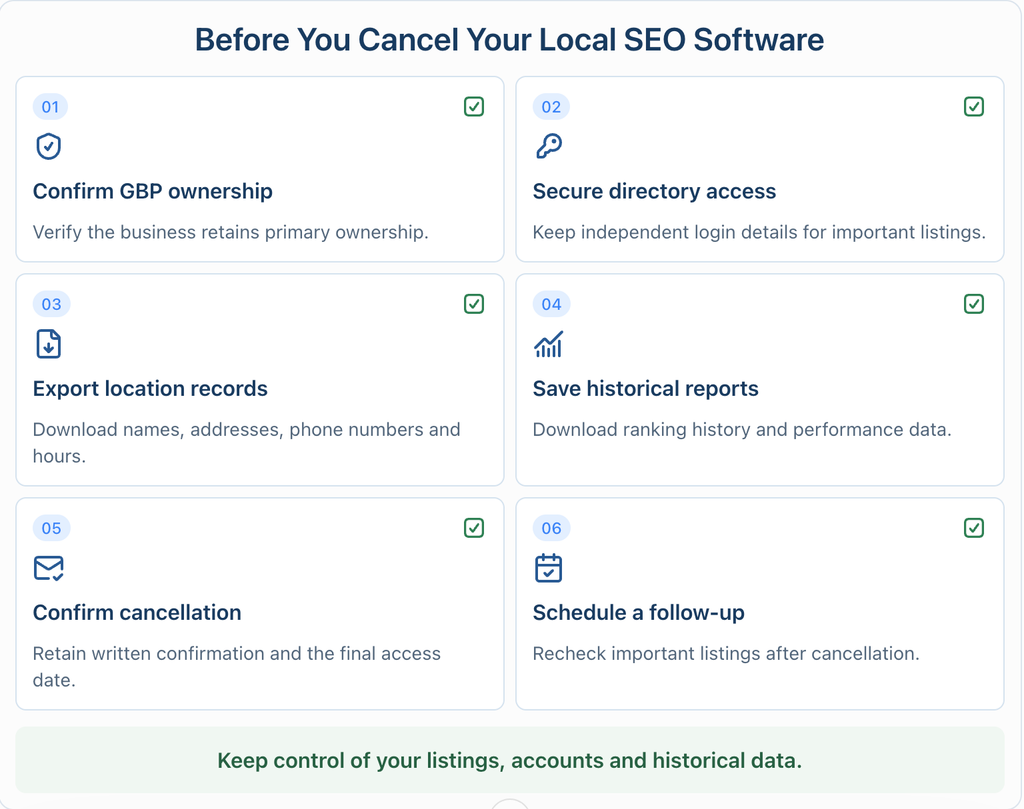
Google’s Business Profile ownership rules allow agencies to receive manager access without sharing passwords. If a transfer becomes necessary, the primary-ownership procedure should be completed while the relevant parties still have access.
For historical data, check the export format and retention period. Semrush documents CSV exports of listing details, while Yext provides CSV and Excel exports from its Knowledge Graph. Export access may depend on your plan and account permissions.
Before signing an annual contract, make sure you can answer one final question: if you stopped paying tomorrow, which business information, reporting history and account permissions would you still control?
Frequently Asked Questions About Local SEO Tools
1. Can local SEO tools improve Google Maps rankings automatically?
No. Local SEO tools can identify problems and automate updates, but Google ranks local businesses using relevance, distance and prominence. No software guarantees higher rankings.
2. How often should a small business track its local rankings?
Monthly tracking is generally sufficient for stable businesses. Check weekly during active SEO campaigns, major profile changes or periods of intense competition, using consistent keywords and locations.
3. Can a service-area business use the same rank-tracking tools as a storefront?
Yes, if the tracker supports hidden-address businesses. Scan your actual service areas, but remember that specifying a service area doesn’t guarantee rankings throughout it.
4. Do you need a separate review management tool?
Not necessarily. Google Business Profile supports free review management. Dedicated software becomes useful when multiple locations, high review volumes or cross-platform responses make manual management impractical.
5. Can a free local SEO stack replace a paid platform?
For one location, often yes. Google Business Profile and Search Console cover essential tasks. Paid local SEO tools become useful for automated tracking, listing synchronization and reporting.
6. Do you need AI-search visibility tracking as part of local SEO?
Not initially. Google’s free Search Console AI reports now show AI-feature impressions. Consider specialist cross-platform tracking when AI-driven discovery becomes relevant to your customers.
Conclusion
The right local SEO stack is the one that solves your business problem without creating five new subscriptions. Start with Google’s free tools, add specialist tracking when location-level visibility matters, and invest in broader software only when listings, reviews or client reporting become recurring work. Whatever you buy, judge progress by qualified calls, bookings and sales—not prettier heatmaps. If you want a strategy before committing to software, Rank and Convert can help connect local search visibility with measurable growth.